
Buiness process data ra representt the requiredd data structure of the businesse of the business data usata used in the Business Process.
We.
We recommendd creatingg business process data of you want to integratntegrate Technical Processes in your BPM process and want to work wk with a prth a predefifineded data structurure in these Technical Processes. For the example process descrscribed here, tthe business process data is required to create a ddeccision table and an associated rule. For more information, see Creating a Decision Table and Inserting a Rule .
You definee this data structuree using so-called domain model filles (.domainmodel). You use domain model filless to crto create a three-levelvel hierarchy for the businessss data, includingg correspondsponding descrptions,s, and thuthus add them too the process definition.
Notes:
-
If you wantt to use the business process data for more than one Business Process, you needd to create the
.domainmodelfile in th the Activities > DomainModel repository folder. -
If you want to use the busibusiness process dataocess data for a specific Business Process,, you need to create the
.domainmodelfilele directlyly ssubordibordinaate to the Business Process. Aft. After ssaviving, the file is immediatelyely attached to th to theStartevent oft of the Business Process. -
For more information on business processss data, sea, see Managing Domain Models.
Howw to definee businnessss process da dataa
Previous step: Creating Pools and Lanes
-
Right-click thehe
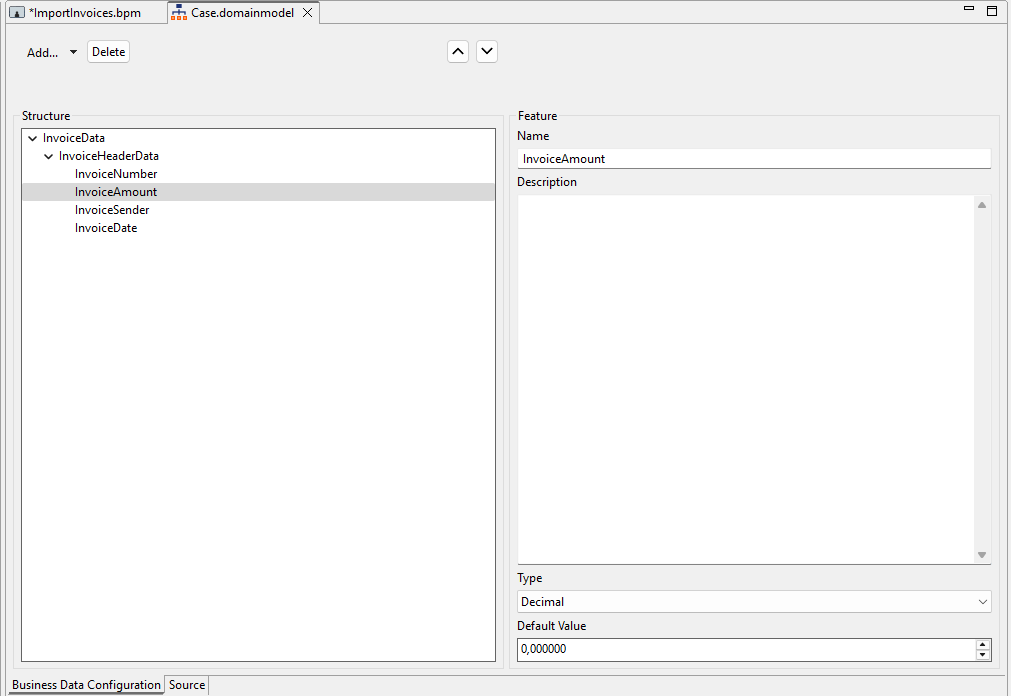
ImportInvoicesBPM Project oject in thehe Projects view and selectct New > Domain Model… to crcreate a DOMAINMODEL f DOMAINMODEL file and define bbusisiness process das data.
✅ TheCase.domainmodelfile is createded and opens automatically in the editor. -
Click Add… to add a new category and enterr the name
InvoiceDatain the Name field. -
Click Add… again too add a new grooup and enterr the name
InvoiceHeaderDatain the Name field. -
Selectct the
InvoiceHeaderDatagroup in thee Structure area, click Add… > Feature, and definne the followinlowing features:
|
Name |
Type |
|---|---|
|
|
|
|
|
|
|
|
|
|
|
|
-
Click
Next step: Defining Case States