
To map processes in X4 BPMS, you need to define the required data structure for the Business Process in a so-called domain model file (.domainmodel).
For this purpose, you define a complex XML structure that maps your business data on the Data Object tab of the domain model file. The stored reference can be an XML or XSD file.
Note:
If you want to work with Data Objects in the X4 BPMS, and therefore more complex data structures, you must first set up the Data Object function. For more information, see Data Objects.
If you want to work with simpler data structures, use the Business Data tab and thus the default functions of the Domain Model file. For more information, see Defining Business Data .
Defining Data Objects
You can define data objects for individual Business Processes and for entire projects, that is, multiple Business Processes.
Note:
-
If you want to use the data object for more than one Business Process, you need to create the
.domainmodelfile in the Activities > DomainModel repository folder. -
If you want to use the data object for a specific Business Process, you need to create the
.domainmodelfile directly subordinate to the Business Process. After saving, the file is immediately attached to theStartevent of the Business Process.
-
In the Projects view, right-click the BPM Process for which you want to create a data object.
-
Select New > Domain Model from the context menu.
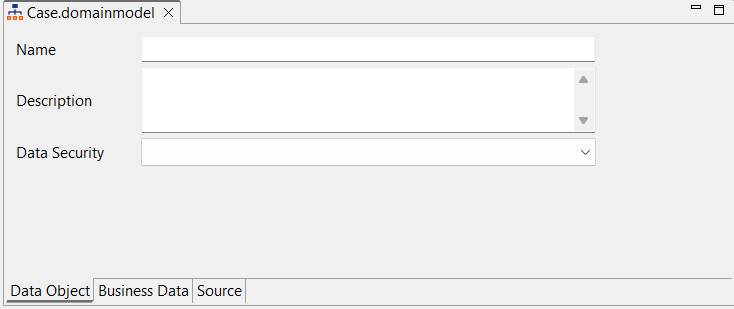
The file is created and opened in the X4 Designer on the Data Object tab.
-
In the Name field, define the name of the data object.
-
If required, enter a Description in the corresponding field.
-
Define the desired Data Security. You can choose from
Low,Medium,High, andVery High.
Note:
Note that the value in the Data Security field is currently only a label that is sent to the database.
-
Click

Note:
-
If you have created the domain model file in the Activities > DomainModel repository folder, you must drag the file to the desired Business Process at this point.
-
Domain model files created subordinate to the Business Process are automatically attached to the
Startprocess component. The business data is thus available in the process and the human tasks included in it.
Using data objects in Human Tasks
With Human Task process components, you can map manual, human activities. When automating the Business Process, these human tasks are linked to executable .humantask files. A human task (.humantask) allows you to configure the Task Management Web App and thus interact with tasks performed by people, which are modeled as a process in the Case Management.
You can work with data from data objects in human tasks. For more information about how to work with data objects in human tasks and the Task Management adapter, see:
Using data objects in Rules
With Rule process components, you map decision rules within a Business Process. The rules to be applied are defined within decision tables (.rule) according to DMN 1.1. The rules can be checked automatically and the results are returned to the Business Process for further processing.
You can create rules based on data from data objects. For more information on how to work with data objects, see Rule.
Displaying data objects in Web Apps
Using the Data Object Web App Adapter, you can integrate data objects into a Technical Process that serves as the backend process of a Web App. The adapter reads the data of a data object and displays the information according to a previously defined view model in the Web App. For more information about the Data Object Web App Adapter, see Data Object Web App Adapter.
Automatic deletion of expired data objects
An automatic background process deletes expired data objects once an hour. The default value of the retentionTime for data objects is 90 days. That is, by default, a data object is considered to have expired 90 days after the timestamp of the last update.
You can adjust the retention time of a data object within a Business Process by inserting the Data Object Persistence Adapter into your process. For more information about the Data Object Persistence Adapter, see Data Object Persistence Adapter.
You can enable or disable the automatic deletion of expired data objects using the system parameter ENABLE_DELECTION_PROCESS. For more information, see Data Objects.