
The SQL Profiling plugin is used to store profiling data into a relational SQL database. To do so, you need to connect the SQL Profiling plugin to a relational SQL database. The plugin is available in <server_directory>\wildfly\modules\de\softproject\x4\plugins but has to be activated in the module.xml file in the <server_directory>\wildfly\modules\de\softproject\plugins\main folder.
Warning
The first start of the profiling must be executed by a database user who has the permission to create database tables. After all tables required have been created, a user with fewer permissions can take over.
When you enable the SQL Profiling, the default profiling in the memory is turned off.
How to configure SQL Profiling
-
In the
<server_directory>/configurationsfolder, create thesql_profiling_config.xmlfile. -
Insert the following content.
XML<?xml version="1.0"?> <Configuration> <DatabaseConfiguration> <ConnectionString></ConnectionString> <UserName></UserName> <Password></Password> </DatabaseConfiguration> <WriteCycle> <Duration></Duration> <TimeUnit></TimeUnit> </WriteCycle> <KeepLogs> <Duration></Duration> <TimeUnit></TimeUnit> </KeepLogs> <KeepCrashedProcessLogs> <Duration></Duration> <TimeUnit></TimeUnit> </KeepCrashedProcessLogs> <RunCleanUp> <Duration></Duration> <TimeUnit></TimeUnit> </RunCleanUp> </Configuration>
-
Enter the required values in the
sql_profiling_config.xmlfile.
DatabaseConfiguration
|
Element |
Description |
Possible values |
|---|---|---|
|
|
JDBC connection string for the connection to the database For more information, see the official JDBC database documentation.
|
|
|
|
User name for the login to the database |
|
|
|
Password for the login to the database |
|
|
|
Specifies the cycles in which data is written to the SQL database. |
The element contains the following elements:
|
|
|
Specifies how long entries are stored before they are cleared automatically. |
The element contains the following elements:
|
|
|
Sets the period of time for which entries for crashed processes are stored before they will be cleared automatically. Crashed processes are not covered by the
|
The element contains the following elements:
|
|
|
Sets the cycles in which the automatic cleanup is performed. |
The element contains the following elements:
|
WriteCycle
|
Element |
Description |
Possible values |
|---|---|---|
|
|
Time span |
|
|
|
Unit of the time span |
|
KeepLogs
|
Element |
Description |
Possible values |
|---|---|---|
|
|
Time span |
|
|
|
Unit of the time span |
|
KeepCrashedProcessLogs
|
Element |
Description |
Possible values |
|---|---|---|
|
|
Time span |
|
|
|
Unit of the time span |
|
RunCleanUp
|
Element |
Description |
Possible values |
|---|---|---|
|
|
Time span |
|
|
|
Unit of the time span |
|
How to install the plugin
-
Open the
module.xmlfile in the<Serververzeichnis>\wildfly\modules\de\softproject\x4\plugins\sql-profiling\mainfolder. -
Copy the plugin name specified in line 2:
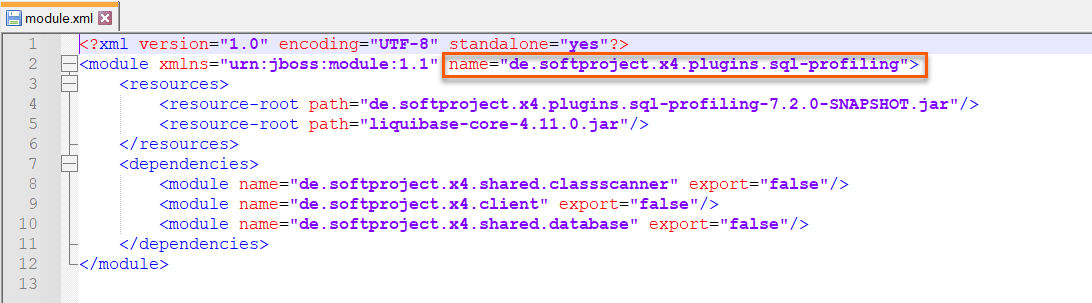
-
Open the
module.xmlfile in the<server_directory>\wildfly\modules\de\softproject\plugins\mainfolder. -
Add the following line to the
module.xmlfile:<module name="de.softproject.x4.plugins.sql-profiling" export="true"/>The file content should look like this:
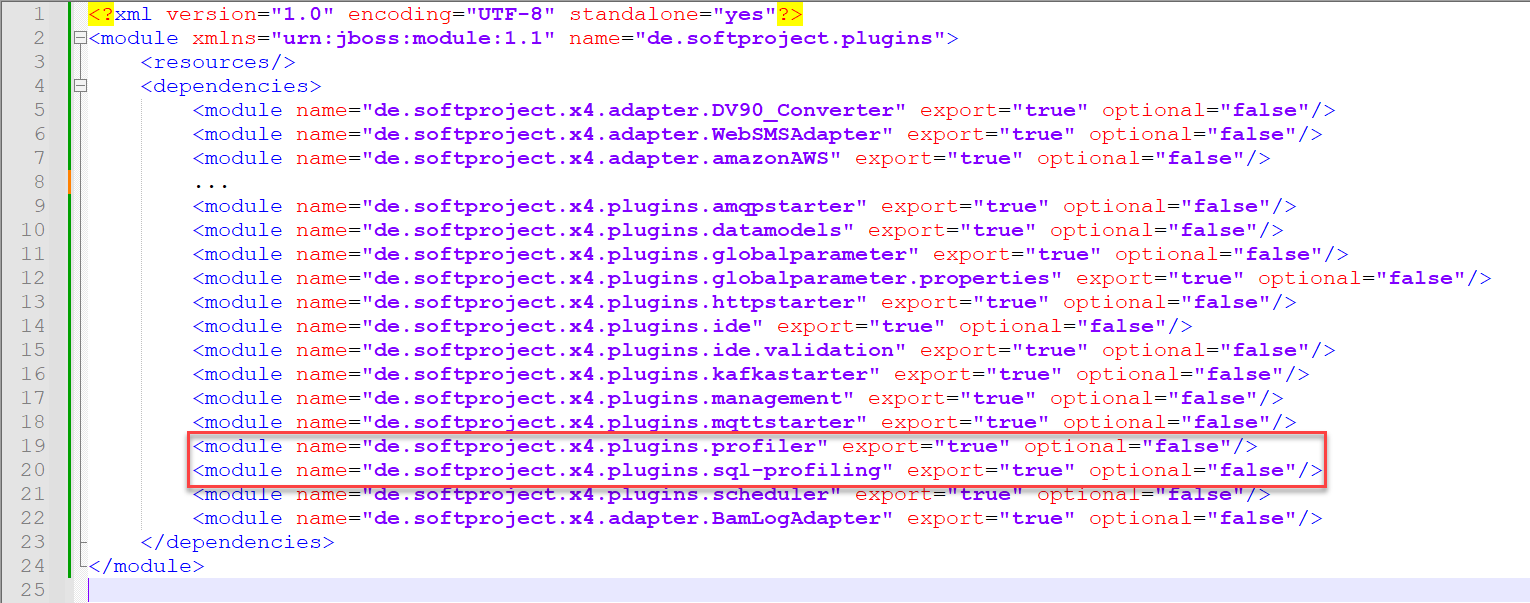
-
Restart the X4 Server.
After restarting the X4 Server, the plugin will be available.