
The BAM Logging adapter requires you to configure the database and manually install the adapter.
How to configure the database
-
In the
<server_directory>/configurationsfolder, create the following file:bam_log_configuration.xml. -
Insert the following content:
XML<?xml version="1.0"?> <Configuration> <ConnectionString>JDBC-CONNECTION</ConnectionString> <UserName>USERNAME</UserName> <Password>PASSWORD</Password> <KeepLogs> <Duration>1</Duration> <TimeUnit>DAYS</TimeUnit> </KeepLogs> <RunCleanUp> <Duration>1</Duration> <TimeUnit>HOURS</TimeUnit> </RunCleanUp> </Configuration>
-
Save the
bam_log_configuration.xmlfile.
How to manually install the adapter
-
Unpack the ZIP folder of the adapter.
-
Copy the adapter folder into the following folder:
<server_directory>\wildfly\modules\de\softproject\x4\adapter. -
Make sure that the
<resource-root path="" />paths in the<resources>element in themodule.xmlfile in the<server_directory>\wildfly\modules\de\softproject\x4\adapter\<name_of_the_adapter>\mainfolder match the names of the*.jarfiles.
Example according to the BAM Log adapters:-
Names of the
*.jarfiles: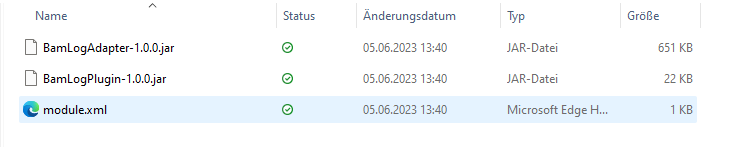
-
Contents of the
module.xmlfile: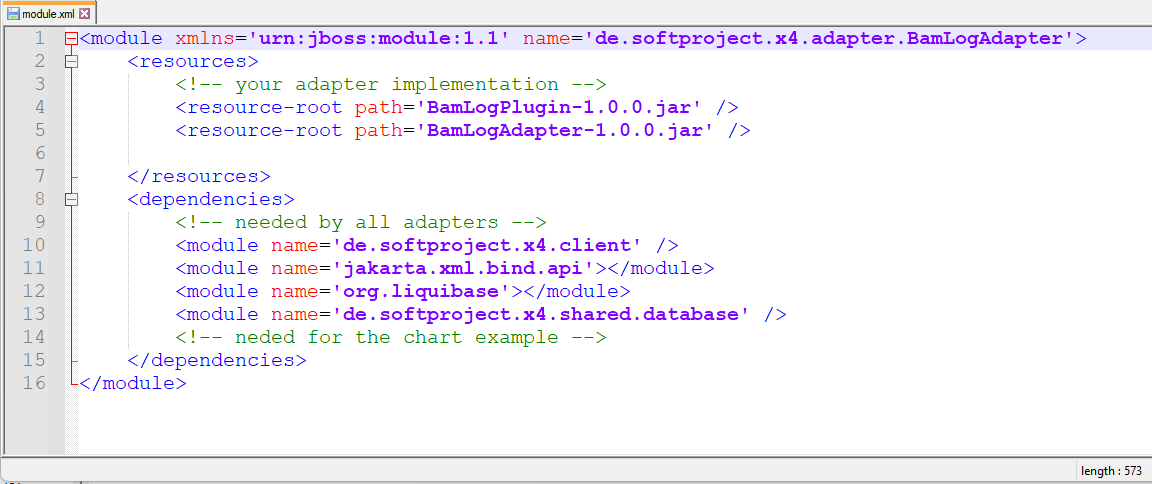
-
-
Insert the name of the adapter in the
module.xmlfile in the<server_directory>\wildfly\modules\de\softproject\plugins\mainfolder:-
Open the
module.xmlfile in the<server_directory>\wildfly\modules\de\softproject\plugins\mainfolder. -
Copy the adapter name into the
<dependencies>tag:<module name="de.softproject.x4.adapter.<name_of_the_adapter>" export="true"/> -
Save the
module.xmlfile.
-
-
Start Keycloak, the X4 Server, and the X4 Designer.
You can now choose and use the adapter in the X4 Designer.