
Depending on the processed data, you can also use XSL mappings to create execution status values as processing instructions that are analyzed by Condition process components within the Technical Process. As a result, you can execute branching process paths depending on status values.
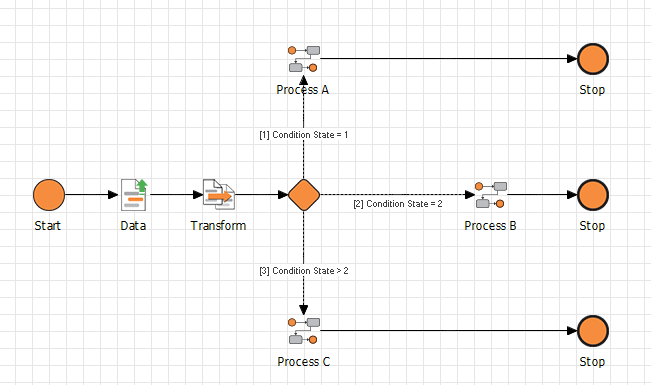
-
Position an empty XSL mapping in front of a
Conditionprocess component in a Technical Process. -
Define processing instruction(s) in the XSL mapping according to the following pattern:
<xsl:processing-instruction name="ConditionState">value</xsl:processing-instruction>
-
Replace
valuewith a value, e.g. from the processed XML document.
Example:<xsl:value-of select="data"/>
Permissible status values: Integers and negative numbers (e.g.
-1). for an error status; see Status Values for Processes and Process StepsThe following status numbers are not permitted, as they are reserved within the system:
-
-999(engine error status) -
-998(process was not executed for licensing reasons) -
999(status ID for process components that have not yet been executed) -
998(used by the savepoint mechanism and causes the entire process to terminate immediately) -
997(causes immediate termination of the entire Technical Process)
Recommendation: Use integers larger than
1000to define custom status values to prevent overlaps with other status values.
-
-
Ensure that the XSL mapping generates a root element so that the XSL mapping can be executed and a valid XML document can be created.
The XSL mapping now outputs processing instructions according to the<?ConditionStatevalue?>pattern. -
Define a status for each branch in the following
Conditionprocess component, see Creating and Using Conditions. -
If you create ConditionStates again later in the process: First, remove the previous processing instructions from the input XML document, e.g. via
<xsl:copy-of>, to avoid unexpected behavior during process execution.
The processed value may be one of the invalid statuses: -999 , -998 , 999, 998 , 997 , or the value is a string. The XML document created by the XSL mapping could also be missing a root element.
-
Only use valid status values (see above).
-
For example, insert an empty
<root/>element into the XSL mapping after the ConditionState definitions.