
To map processes in X4 BPMS, you need to define the required data structure for the Business Process in a so-called domain model file (.domainmodel).
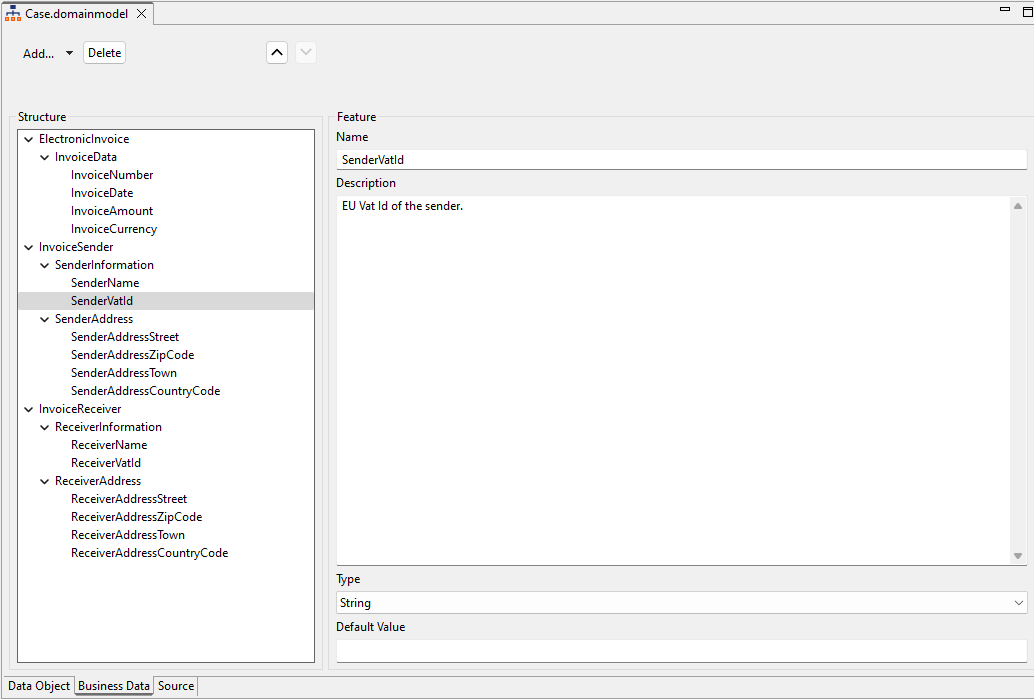
On the Business Data tab of the domain model file, you can define a hierarchy of up to three levels with business data structures including corresponding descriptions.
Note:
If you want to work with more complex data structures, you can store complex XML structures on the Data Object tab. For more information, see Defining Data Objects .
Business data structure
The business data for a process are divided into categories (category), groups (group), and features(feature):
|
Category |
A category groups business data at the highest level and can contain additional groups. Each category has a name, position, and optional description. |
|
Group |
A group summarizes the features of the business data within a category. Each group has a name, position, and optional description. |
|
Feature |
A feature defines the specific properties of the business process data, e.g. an order date within a feature group. Each feature has a unique name in the domain model, a position, an optional description, a data type, and an optional default value. |
Available data types for features
You can define a data type for each feature you create. The selected data type determines the expected range of values for this feature.
|
Data type |
Description |
|---|---|
|
|
Character string |
|
|
Integer |
|
|
Floating point number |
|
|
Boolean value |
|
|
Date and time |
Defining Business Data
You can define business process data for individual Business Processes and for entire projects, that is, multiple Business Processes.
-
If you want to use the business data for more than one Business Process, you need to create the
.domainmodelfile in the Activities > DomainModel repository folder. -
If you want to use the business data for a specific Business Process, you need to create the
.domainmodelfile directly subordinate to the Business Process. After saving, the file is immediately attached to theStartevent of the Business Process.
-
Right-click the BPM Process for which you want to define the business data in the Projects view.
-
Select New > Domain Model from the context menu.
The file is created and opened in the X4 Designer.
Note:
If you are working with Data Objects in your X4 BPMS, the file opens on the Data Object tab. Go to the Business Data tab to create business data.
-
Define the structure of the business data and add corresponding descriptions:
-
Click Add or select Add > Category to create a new feature category and specify a Name and a Description.
-
Click Add within a category or select Add

-
Click Add within a category or select
-
Click 

Click the Delete button to delete an entry selected in the tree structure.
-
Click

-
If you have created the domain model file in the Activities > DomainModel repository folder, you must drag the file into the desired Business Process at this point.
-
Domain model files created subordinate to the Business Process are automatically attached to the
Startprocess component. The business data is thus available in the process and the human tasks included in it.