<HTMLDocument> controls can be used to display static HTML (markup text), such as emails. All common HTML5 elements that can be viewed by the browser are supported.
Instructions for use
An <HTMLDocument> control is created with the <HTMLDocument> element.
<HTMLDocument>
...
</HTMLDocument>
<HTMLDocument> controls can be used in all available layout types. For more information, see Layouts.
Note:
-
The display of HTML is implemented as an iFrame in sandbox mode. Therefore, JavaScript is not executed by default. If an embedded resource (such as video, graphics, or audio) contains JavaScript, that resource is not displayed.
-
The
<video>and<audio>elements are not supported by Safari. -
The
<video>,<picture>, and<source>elements do not appear on an iPad. -
The display can be formatted with a
<style>tag in the<head>element of the HTML document. Local CSS files are not supported.
Attribute
You can define the following attributes for <HTMLDocument> controls.
|
Attribute |
Description |
|---|---|
|
|
Allows embedded content to submit forms. Possible values:
|
|
|
Allows embedded content to display a modal dialog. Possible values:
|
|
|
Allows embedded content to interpret mouse movements directly as an input method. Possible values:
|
|
|
Allows embedded content to open a web page in a new window or tab. Possible values:
|
|
|
Required Technical Process that delivers the HTML document. Possible values: String (URI) The called Technical Process must return a complete HTML document! |
|
|
Allows the content to use JavaScript. Possible values:
|
|
|
Allows embedded content to open a web page in the same window or tab. Possible values:
|
|
|
Specifies whether sandbox mode is enabled or disabled.
|
Example
In the Web App definition (.wad), the <HTMLDocument> control is linked to the Technical Process Sample.wrf.
<WebApp xmlns="http://softproject.de/webapp/1.0"
        path="HtmlDocument">
   <Modules>
      <Module displayName="My Module" path="Module">
         <Components>
            <DetailComponent default="true"
                             displayName="Dashboard"
                             path="Dashboard"
                             process="load.wrf">
               <Properties>
                  <Property name="string" type="String"/>
               </Properties>
               <FlowLayout>
                  <HTMLDocument process="Sample.wrf" units="pixels"/>
               </FlowLayout>
            </DetailComponent>
         </Components>
      </Module>
   </Modules>
</WebApp>
The Technical Process Sample.wrf provides an HTML document:
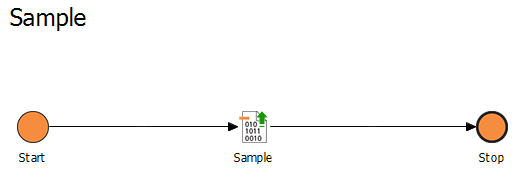
The HTML document provided by the Technical Process looks like this:
<html>
	<!DOCTYPE html PUBLIC "-//W3C//DTD XHTML 1.0 Strict//EN" "http://www.w3.org/TR/xhtml1/DTD/xhtml1-strict.dtd">
	<html xmlns="http://www.w3.org/1999/xhtml">
		<head>
			<meta http-equiv="Content-Type" content="text/html; charset=utf-8" />
			<meta name="viewport" content="width=device-width, initial-scale=1.0, maximum-scale=1.0" />
			<style>
				body{
					font-family: Arial, sans-serif;
					padding: 10px;
				}

				table, td, th{
					border: 1px solid grey;
					padding: 5px;
					border-collapse: collapse;
				}

				th{
					background-color: grey;
					color: white;
				}
			</style>
		</head>
		<body>
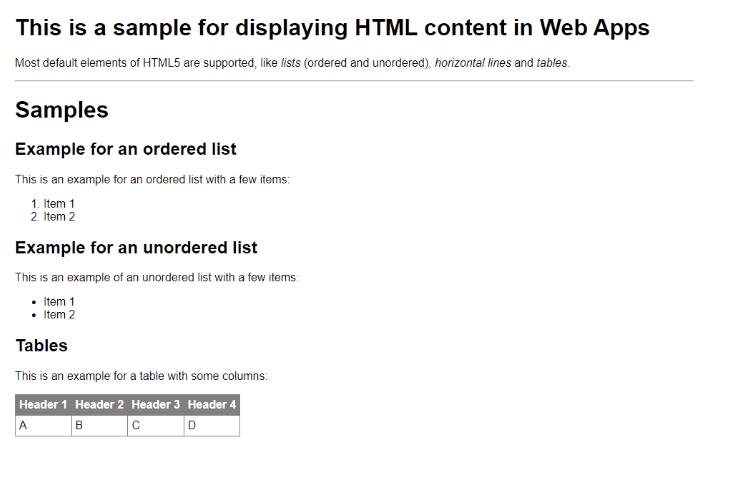
			<h1>This is a sample for displaying HTML content in Web Apps</h1>
			<p>Most default elements of HTML5 are supported like <i>lists</i> (ordered and unordered), <i>horizontal lines</i> and <i>tables</i>.</p>
			<hr/>
			<h1>Samples</h1>
			<h2>Example for an ordered list</h2>
			<p>This is an example for an ordered list with a few items:</p>
			<ol>
				<li>
					Item 1
				</li>
				<li>
					Item 2
				</li>
			</ol>
			<h2>Example for an unordered list</h2>
			<p>This is an example for an unordered list with a few items:</p>
			<ul>
				<li>
					Item 1
				</li>
				<li>
					Item 2
				</li>
			</ul>
			<h2>Tables</h2>
			<p>This is an example for a table with some columns:</p>
			<table>
				<thead>
					<th>Header 1</th>
					<th>Header 2</th>
					<th>Header 3</th>
					<th>Header 4</th>
				</thead>
				<tr>
					<td>A</td>
					<td>B</td>
					<td>C</td>
					<td>D</td>
				</tr>
			</table>
		</body>
	</html>
The HTML document is displayed in the Web App as follows: