
Learn how to search for text, regular expressions and UTF-8 symbols within the repository using the Find in Files function.
Note that only file contents are searched. File names are not included in the search.
-
Select menu Edit > Find in Files.
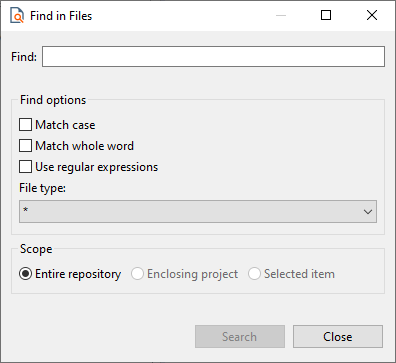
The search window is opened.
-
Enter the characters to search for in Find.
-
Specify search options:Match Case: The search is case-sensitive.Match whole word: Search for the entire word.Use regular expression: Search for regular expressions.File type: Specify the file type to be searched, e.g. bpm or fa. With the setting * all file types are searched.
-
Define the search scope:Entire repository: Search within the entire repository.Enclosing project: Perform the search only within the selected project.Selected item: Limit the search to the selected elements.
-
Click Search.
You can also search by adapter parameters, for example, to display all adapters with a specific parameter.