
The access and editing of resources such as Controls and GridColumns can also be controlled via the User Identity Adapter. This adapter acts as an interface between the user identity provided by an identity provider (IdP) and the access rights in the system.
How it works
With the User Identity Adapter, the authentication and authorization information that comes from the IdP (e.g., Keycloak or another OIDC-compatible system) can be retrieved and processed as required within ESB processes.
This allows access rights within X4 to be set based on the externally assigned roles or groups of the IdP.
Examples
There are three Keycloak users in a Web App:
-
Access: Access to general content
-
CEO: Access to content that should only be visible to the CEO
-
Admin: Access to content that should only be visible to the administrator
The Detail Component accesses a technical process (.wrffile) in which the User Identity Adapter checks which user is currenty logged in. The mapping following the adapter then checks which component the user has access to:
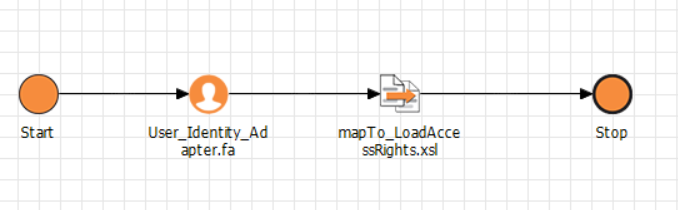
The users are specified in the properties (<Properties/>) of the Detail Component:
<?xml version="1.0" encoding="UTF-8"?>
<DetailComponent
	xmlns="http://softproject.de/webapp/1.0" process="AccessRights/LoadUserIdentityCard.wrf">
	<Properties>
		<Property name="ACCESS" type="Complex">
		<Property name="CEO" type="Boolean"/>
		<Property name="ADMIN" type="Boolean"/>
		</Property>
	</Properties>
...
</DetailComponent>
Mapping with access rights check:
<?xml version="1.0" encoding="UTF-8"?>
<xsl:stylesheet exclude-result-prefixes="xs" version="2.0"
  xmlns:xs="http://www.w3.org/2001/XMLSchema" xmlns:xsl="http://www.w3.org/1999/XSL/Transform">
  <xsl:output media-type="text/xml" method="xml"/>
  <xsl:template match="/">
    <Ok>
      <ACCESS>
        <CEO>
          <xsl:choose>
            <xsl:when test="//Roles/Role = 'ceo'">true</xsl:when>
            <xsl:otherwise>false</xsl:otherwise>
          </xsl:choose>
        </CEO>
        <ADMIN>
          <xsl:choose>
            <xsl:when test="//Roles/Role = 'admin'">true</xsl:when>
            <xsl:otherwise>false</xsl:otherwise>
          </xsl:choose>
        </ADMIN>
      </ACCESS>
    </Ok>
  </xsl:template>
</xsl:stylesheet>
<!--Created by X4 Designer, Copyright © SoftProject GmbH. All rights reserved.-->