
Example: BPM Project
In the X4 Designer, you can graphically model one or more Business Processes (BPM processes *.bpm) within a BPM Project.
The Business Process can be modeled using different process components. These can be dragged into the drawing surface and linked to Technical Processes.
For this example BPM Project, you model the process "Import and approve invoices", which combines Technical Processes with manual work steps of your employees and graphically maps them. Received invoices should be automatically forwarded by Technical Processes if the invoice value is less than 1000. If the invoice value is greater than 1000, an accounting employee should perform a manual invoice check. Only when a corresponding invoice has been accepted manually will it be forwarded.
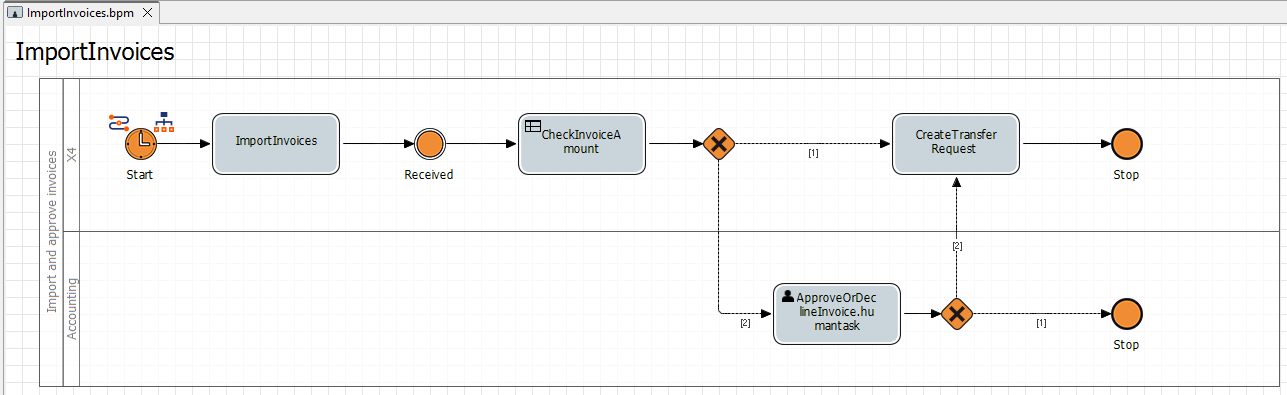

Note:
Note that the example process described here initially only models the process flow. The Getting Started section only describes how to replicate one of the included Technical Processes. For instructions on how to create this Technical Process, see Example: ESB Project and the corresponding subpages.
Before you can begin modeling a process, you must first create a BPM Project.
Creating a BPM Project
Right-click in the Projects view.
Under New, select the BPM Project… project type.
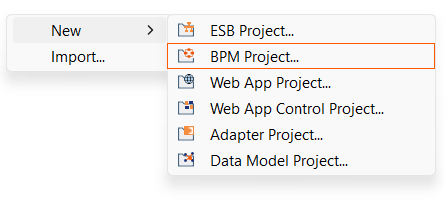
The Project Creation Wizard dialog opens.
In the Project name text field, enter a name for your project.
Click Finish.
✅ Your new project has been created and you can see the project structure created in the Projects view.
Required BPM process components
You model your BPM processes in so-called BPM process files. For this purpose, various elements are available in the Palette view.
For more information on the other elements in the Palette view, see BPMN Process Components and Their Use.
The following elements are relevant to the example process described here.
Icon | Name | Description |
|---|---|---|
|
| Defines the start event of the Business Process according to BPMN 2.0 and allows differentiation of different event types. |
|
| Divides a Business Process into responsibilities and stakeholders in accordance with BPMN 2.0. |
|
| An |
|
| Defines an intermediate event within a Business Process in accordance with BPMN 2.0 and also enables setting an activity status value via the |
|
| The |
|
| Defines an exclusive, branching gateway according to BPMN 2.0. |
|
| With A human task ( |
|
| Basic element for defining the end of the process. |


You can find the next steps in this example project on the following pages: