
Defining Business Process Data
Buiness process data represent the required data structure of the business data used in the Business Process.
We recomment creating business process data if you want to integrate Technical Processes into your BPM process and work with a predefined data structure in these Technical Processes. For the example process described here, the process technical data is required to create a decision table and an associated rule. For more information, see Creating a Decision Table and Inserting a Rule.
You define this data structure using so-called domain model files (.domainmodel). In these domain model files, you can define a three-level hierarchy for the business data, including corresponding descriptions and thus add it to the process definition.

Notes:
If you want to use the business proess data for more than one Business Process, you need to create the
.domainmodelfile in the Activities > DomainModel repository folder.If you want to use the business process data for a specific Business Process, you need to create the
.domainmodelfile directly below the Business Process. Once saved, it is attached directly to theStartevent of the Business Process.For more information on business process data, see Managing Business Process Data .
How to define business process data
Previous step: Creating Pools and Lanes
Right-click the
ImportInvoicesBPM Project in the Projects view and select New > Domain Model to create a DOMAINMODEL file and define business process data.
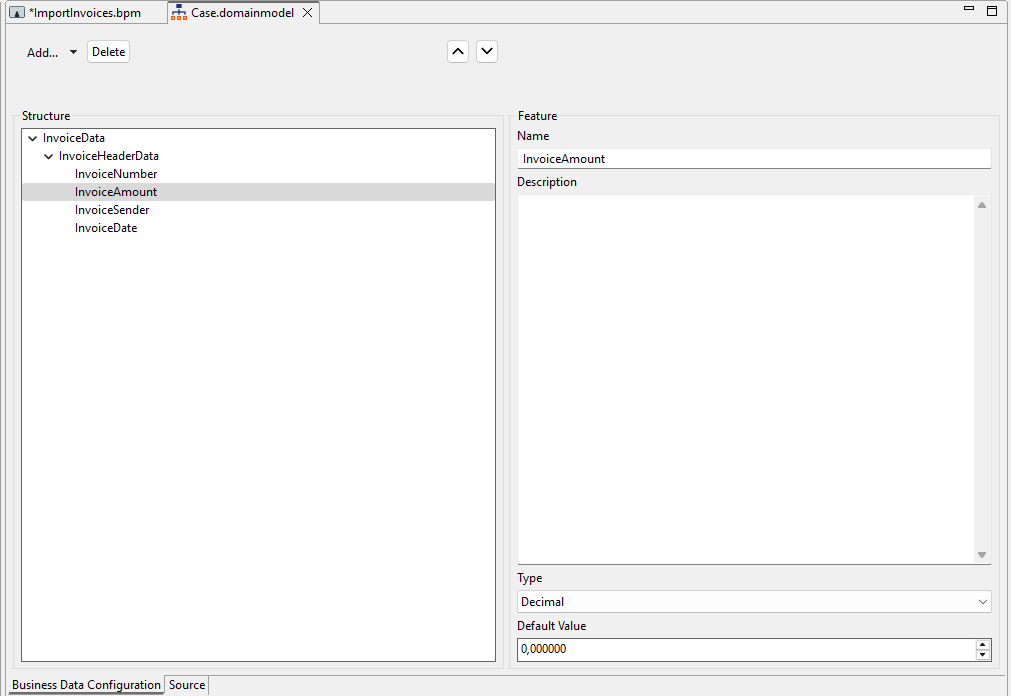
✅ TheCase.domainmodelfile is created and opens automatically in the editor.Click Add to add a new category and enter the name
InvoiceDatain the Name field.Click Add again to add a new group and enter the name
InvoiceHeaderDatain the Name field.Select the
InvoiceHeaderDatagroup in the Structure pane, click Add > Feature, and define the following features:
Name | Type |
|---|---|
|
|
|
|
|
|
|
|
Select
Save.
Next step: Defining Case States