A line chart can be used to display trends or changes over time. Data points are connected by straight line segments. Multiple series of numbers can also be displayed in a line chart.
A line chart can contain the following elements:
-
<Line>: Contains all the elements that belong to the line chart. -
<Axis>: Defines the axis labels. -
<LineData>: Defines how the data are displayed. A<LineData>element must be defined for each data record, that is, each line in the line chart. -
<Tooltip>: Defines how the tooltip for each value should be displayed in the chart.
General attributes
The following attributes are available for all elements of a line chart:
|
Attribute |
Description |
|---|---|
|
|
Specifies the font family.
Possible values:
|
|
|
Sets the font size.
Possible values:
|
|
|
Defines the width of each character. This attribute overrides the default character width for this layout. Possible values:
This attribute does not work for the |
|
|
Defines the tilt of the font. This attribute overrides the default font tilt for this layout. Possible values:
|
|
|
Defines the font weight. This attribute overrides the default font weight for this layout. Possible values:
This attribute does not work for the |
|
|
Defines the font color. This setting overrides the default color of the color scheme!
Do not use a hash before the color value!
|
Line
<Line> : Contains all the elements that belong to the line chart.
In addition to the general attributes, <Line> can have the following attributes:
|
Attribute |
Description |
|---|---|
|
|
Specifies whether to display a legend. Possible values: |
Axis
<Axis> : Child element of <Line> . Defines the axis labels.
In addition to the general attributes, <Axis> can have the following attributes:
|
Attribute |
Description |
|---|---|
|
|
Defines the color of the axes. Possible values:
Do not use a hash before the color value!
|
|
|
Defines the label of the x-axis. Possible values: Any string |
|
|
Maximum value of the x-axis Possible values: Integer |
|
|
Minimum value of the x-axis Possible values: Integer |
|
|
Unit of the x-axis Possible values: Integer |
|
|
Defines the label of the y-axis. Possible values: Any string |
|
|
Maximum value of the y-axis Possible values: Integer |
|
|
Minimum value of the y-axis Possible values: Integer |
|
|
Unit of the y-axis Possible values: Integer |
LineData
<LineData> : Child element of <Line> . Defines how the data are displayed. A <LineData> element must be defined for each data record, that is, each line in the line chart.
In addition to the general attributes, <LineData> can have the following attributes:
|
Attribute |
Description |
|---|---|
|
|
Defines the color of the line. Possible values: Hexadecimal color value or expression for data binding ( If the |
|
|
Specifies which data are displayed in the chart. Possible values: Data binding possible |
|
|
Specifies whether the data points are labeled with the respective value. Possible values: |
|
|
Specifies how a data point is represented. Possible values:
|
|
|
Defines whether data points are marked. Possible values: |
|
|
Name of the data record displayed in the legend. Possible values: Any string |
|
|
Specifies which data is displayed in the chart on the x-axis. The specified string refers to a defined property in the provided Possible values: Data binding possible |
|
|
Specifies which data is displayed in the chart on the y-axis. The specified string refers to a defined property in the provided Possible values: Data binding possible |
Tooltip
<Tooltip>: Child element of <Line> . Defines how the tooltip for each value should be displayed in the chart.
For <Tooltip> , you can define the general attributes (see above).
Examples of line charts
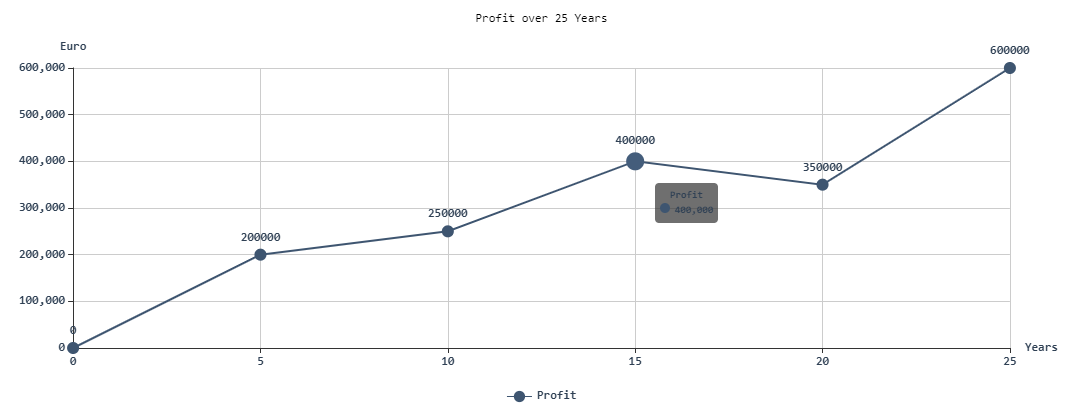
Example 1:
<Properties>
	<Property name="DataSource" type="Complex">
		<Property name="Profit" type="List">
			<Property name="Years" type="Integer"/>
			<Property name="Money" type="Integer"/>
		</Property>
	</Property>
</Properties>
<FlowLayout>
	<Chart  fontFamily="Font01" title="Profit over 25 Years">
		<Line fontSize="medium" fontStyle="normal" fontFamily="Font02" fontWeight="Black" foreground="A700" legend="true">
			<Tooltip fontFamily="Font01" fontSize="30"/>
			<Axis fontFamily="Font03" horizontalLabel="Years" verticalLabel="Euro"/>
			<LineData data="#DataSource.Profit" labels="true" name="Profit" xValues="#Years" yValues="#Money"/>
		</Line>
	</Chart>
</FlowLayout>
Output format of the process
Example 2:
<Property name="Datasource" type="Complex">
    <Property name="LineDataSet1" type="List">
        <Property name="xValue" type="Integer"/>
        <Property name="yValue" type="Integer"/>
    </Property>
    <Property name="LineDataSet2" type="List">
        <Property name="xValue" type="Integer"/>
        <Property name="yValue" type="Integer"/>
    </Property>
</Property>
	...
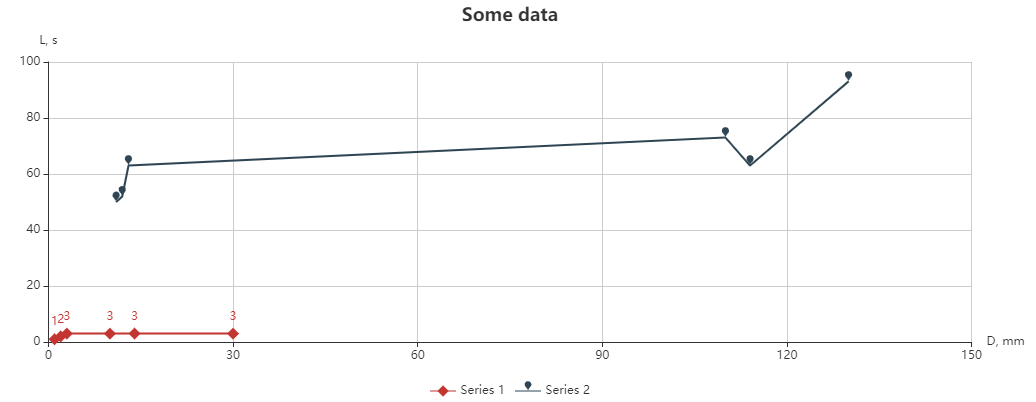
<Chart title="Some data">
    <Line>
        <Axis horizontalLabel="D, mm" verticalLabel="L, s" />
        <LineData data="#Datasource.LineDataSet1" xValues="#xValue"
            yValues="#yValue" name="Series 1" marker="diamond" labels="true" />
        <LineData data="#Datasource.LineDataSet2" xValues="#xValue"
            yValues="#yValue" name="Series 2" marker="pin" />
    </Line>
</Chart>
The LineData element is used to represent a line in the chart. The displayed data itself is contained in the Datasource property. In the example above, the data is retrieved using the data binding expression #Datasource.LineDataSet1.
Output format of the process
The example above results in the following chart: