
There are several ways to configure an X4 installation that runs as a Windows or Linux service. We show one of the options here.
For this purpose, the standalone.bat file (Windows) or standalone.conf file (Linux) has to be changed in the following folder:
-
Windows:
<server_directory>\wildfly\bin\standalone.bat -
Linux:
<server_directory>\wildfly\bin\standalone.conf
How to change the standalone.bat file (Windows)
-
Open the
standalone.batfile in the<server_directory>\wildfly\bin\standalone.batfolder in a text editor. -
Add the following command line parameter in the
standalone.batfile: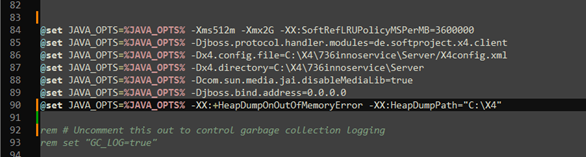
Command line parameter for Windows
@set JAVA_OPTS=%JAVA_OPTS% -XX:+HeapDumpOnOutOfMemoryError -XX:HeapDumpPath="<PathToStoreTheHeapDump>"
-
Adjust the path where the heap dump is to be saved.
Only absolute paths are possible.
-
Save the
standalone.batfile.
If a memory shortage occurs with the modified standalone.bat file, a file with a name such as java_pid23948.hprof is saved in the specified path. This file contains the heap dump.
How to adapt thestandalone.conf file (Linux)
-
Open the
standalone.conffile in the<server_directory>\wildfly\bin\standalone.conffolder in a text editor. -
Add this command line parameter in the
standalone.conffile analogous to windows:
Command line parameter for Linux:JAVA_OPTS=$JAVA_OPTS -XX:+HeapDumpOnOutOfMemoryError -XX:HeapDumpPath="<PathToStoreTheHeapDump>"
-
Adjust the path where the heap dump is to be saved.
-
Save the
standalone.conffile.
If a memory shortage occurs with the modified startX4.conf file, a file with a name such as java_pid23948.hprof is saved in the specified path. This file contains the heap dump.