
Learn how to search for text, regular expressions and UTF-8 symbols within the repository using the Find in Files function.
Note that only file contents are searched. File names are not included in the search.
-
Select menu Edit > Find in Files.
The search window is opened.
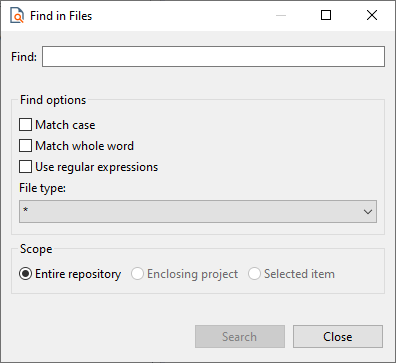
-
Enter the characters to search for in Find.
-
Specify search options:
-
Match Case: The search is case-sensitive.
-
Match whole word: Search for the entire word.
-
Use regular expression: Search for regular expressions.
-
File type: Specify the file type to be searched, e.g.
bpmorfa.With the setting
*all file types are searched.
-
-
Define the search scope:
-
Entire repository: Search within the entire repository.
-
Enclosing project: Perform the search only within the selected project.
-
Selected item: Limit the search to the selected elements.
-
-
Click Search.
You can also search by adapter parameters, for example, to display all adapters with a specific parameter.