
The User Identity Adapter can be used to restrict access and editing of controls and GridColumns via users stored in Keycloak.
Example:
There are three Keycloak users in a Web App:
-
Access: Access to general content
-
CEO: Access to content that should only be visible to the CEO
-
Admin: Access to content that should only be visible to the administrator
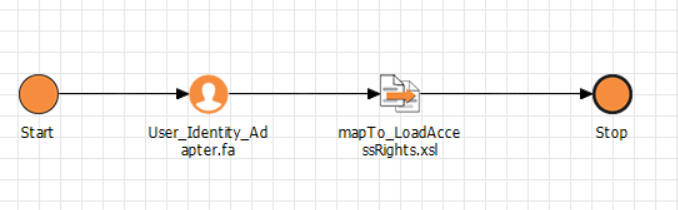
The Detail Component accesses a technical process (.wrffile) in which the User Identity Adapter checks which user is currenty logged in. The mapping following the adapter then checks which component the user has access to:
The users are specified in the properties (<Properties/>) of the Detail Component:
XML
<?xml version="1.0" encoding="UTF-8"?>
<DetailComponent
	xmlns="http://softproject.de/webapp/1.0" process="AccessRights/LoadUserIdentityCard.wrf">
	<Properties>
		<Property name="ACCESS" type="Complex">
		<Property name="CEO" type="Boolean"/>
		<Property name="ADMIN" type="Boolean"/>
		</Property>
	</Properties>
...
</DetailComponent>
Mapping with access rights check:
XML
<?xml version="1.0" encoding="UTF-8"?>
<xsl:stylesheet exclude-result-prefixes="xs" version="2.0"
  xmlns:xs="http://www.w3.org/2001/XMLSchema" xmlns:xsl="http://www.w3.org/1999/XSL/Transform">
  <xsl:output media-type="text/xml" method="xml"/>
  <xsl:template match="/">
    <Ok>
      <ACCESS>
        <CEO>
          <xsl:choose>
            <xsl:when test="//Roles/Role = 'ceo'">true</xsl:when>
            <xsl:otherwise>false</xsl:otherwise>
          </xsl:choose>
        </CEO>
        <ADMIN>
          <xsl:choose>
            <xsl:when test="//Roles/Role = 'admin'">true</xsl:when>
            <xsl:otherwise>false</xsl:otherwise>
          </xsl:choose>
        </ADMIN>
      </ACCESS>
    </Ok>
  </xsl:template>
</xsl:stylesheet>
<!--Created by X4 Designer, Copyright © SoftProject GmbH. All rights reserved.-->