|
|
|

Properties
Note:
Some properties are only visible if the Show Advanced Properties option is enabled in the Properties view.
|
|
Free text field for labeling the transition (for a clearer design or documentation) |
|
|
Enable logging via Log4j at this point in the process with the current input data. To enable Log4j logging, highlight the property and click Possible values:
|
|
|
Set savepoint at this point in the process to persist the complete state of the process engine with the processed data and status information in the file system when executing a process instance. The process instance can be restarted from the last saved savepoint via the monitoring interface. Possible values:
Note: If you are working with X4 BPMS 7.4.0 or higher, the WildFly version used may restrict the amount of data processed when loading savepoints. See (7.4.4-en) Save Point Configuration for the X4 Server more information on how to remove or expand the appropriate restrictions. |
|
|
Component at which the transition line startes (is set by the X4 Designer) |
|
|
Component to which the transition line leads (is set by the X4 Designer) |
|
|
For Possible values:
|
|
|
For condition components: execution condition stored by the Condition Manager (is set by the Condition Manager) |

Example
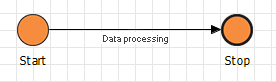
Transition between two process components with a label: