
How to install adapters manually
-
Unzip the adapter's ZIP folder.
-
Copy the adapter folder into the
<server_directory>\wildfly\modules\de\softproject\x4\adapterfolder. -
Make sure the
<resource-root path="" />paths in the<resources>element in themodule.xmlfile in the<server_directory>\wildfly\modules\de\softproject\x4\adapter\<name of the adapter>\mainfolder match the names of the*.jarfiles.
Example using the BAM Log adapter:-
Names of
*.jarfiles: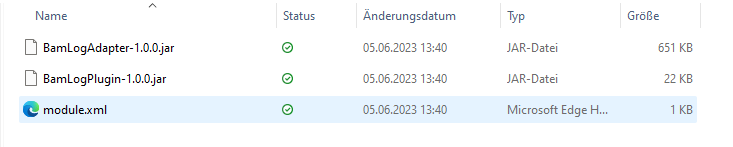
-
Contents of the
module.xmlfile: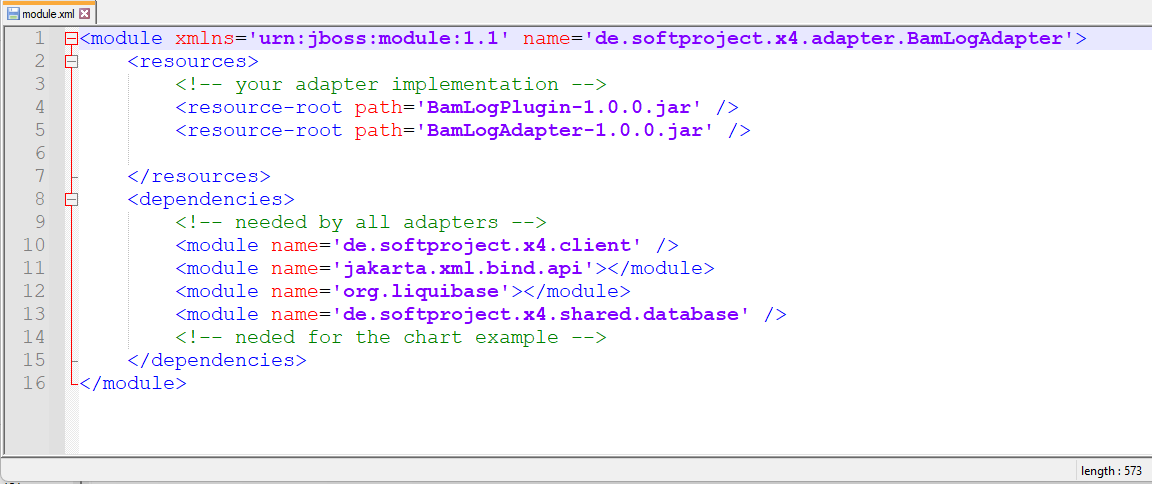
-
-
Add the name of the adapter to the
module.xmlfile in the<server_directory>\wildfly\modules\de\softproject\plugins\mainfolder:-
Open the
module.xmlfile in the<server_directory>\wildfly\modules\de\softproject\plugins\mainfolder. -
Copy the plugin name into the
<dependencies>tag:<module name="de.softproject.x4.adapter.<name of the adapter>" export="true"/> -
Save the
module.xmlfile.
-
-
Launch Keycloak, the X4 Server, and the X4 Designer.
The adapter can now be selected and used in the X4 Designer.