
The following list contains the known issues at the time of the release of X4 BPMS 7.4.3.
X4 Server
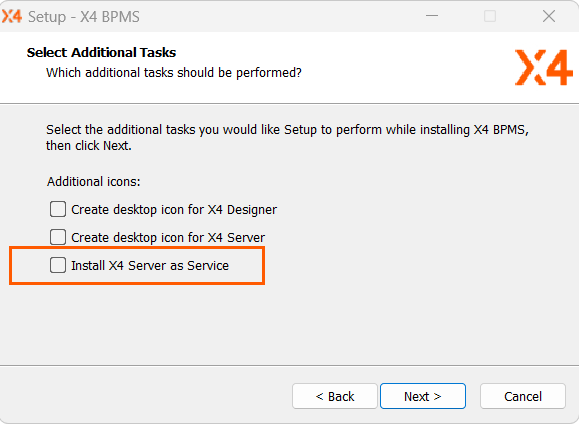
Installation of the X4 Server as Service not possible
https://softproject.atlassian.net/browse/X4BUG-852
When installing the All-in-One installation package (see All-in-One - Interactive Installation), it is currently not possible to install the X4 Server as a service.
During the installation, make sure that the Install X4 Server as Service checkbox is unchecked before selecting Next.
Scheduled events in BPM do not resume at the correct time
https://softproject.atlassian.net/browse/X4BUG-1287
Regardless of whether scheduled events are configured using a duration or date value, the continuation does not occur at the specified time.
X4 Web Apps
Navigation to tabs with video is not possible without restriction
https://softproject.atlassian.net/browse/X4BUG-148
When embedding a video on a tab that is not the first tab in a dashboard, you cannot navigate to the remaining tabs.
Authorization Code Flow stops working after the Keycloak token expires
https://softproject.atlassian.net/browse/X4BUG-488
If, after the Keycloak access token has expired in a Web App with Authorization Code Flow, another Web App with Authorization Code Flow is called via the externalLink attribute in a button, the login does not work.
Existing entries in a List Component are duplicated after the first update when a new entry is added
https://softproject.atlassian.net/browse/X4BUG-1048
When a new entry is added to a List Component and the Web App is reloaded, the existing list entries are duplicated. If the Web App is reloaded again, the duplicates will no longer exist.
Map Control: Icons do not load correctly when using routes and markers
https://softproject.atlassian.net/browse/X4BUG-1163
If routes and markers are used in a Map control, the icons for both elements will not load correctly and no route will appear on the map. If the Map control is used in the Detail part of a Master/Detail component, this problem does not occur.
Radio button with property of the Boolean type and true value will not be disabled after changing the value to false
https://softproject.atlassian.net/browse/X4BUG-1298
If two RadioButton controls with a Boolean property are included in a Web App, both of which are set to true, and the value for a RadioButton control is changed to false, the corresponding option field is not disabled in the Web App.
Filter and sort settings for columns in a Grid component within a dialog are not retained
https://softproject.atlassian.net/browse/X4BUG-1332
In a Grid component used within a dialog, the filter and sorting settings for the columns in the Grid are reset despite using the <Remember> element.
Validation message does not appear in the correct position
https://softproject.atlassian.net/browse/X4BUG-1346
Validation messages displayed, for example, when users enter a too-long expression in a text field, are aligned in the center and not displayed at the beginning of the text field.
Grid component: The rememberPage attribute of the Remember element has no effect
https://softproject.atlassian.net/browse/X4BUG-1360
The Grid component's paging setting is not retained, even if the rememberPage attribute in the Remember element is set to true.
Grid component: Modified column order is not retained
https://softproject.atlassian.net/browse/X4BUG-1363
If the column order is changed in a Grid component, the changed order is not retained as desired after reloading the Web App.
Custom controls are not displayed correctly
https://softproject.atlassian.net/browse/X4BUG-1365
In some cases , custom controls are always rendered at a height of 150 pixels, regardless of the setting.
Incorrect encoding of data
https://softproject.atlassian.net/browse/X4BUG-1390
If a file upload is executed in a Web App, data with umlauts is not transferred correctly in some cases.