
Use the ALL, ERRORS and ACTIVE radio buttons in the Instance view to filter the list of process instances.
|
Displays all process instances. |

|
Displays process instances in the |

|
Displays process instances in the |
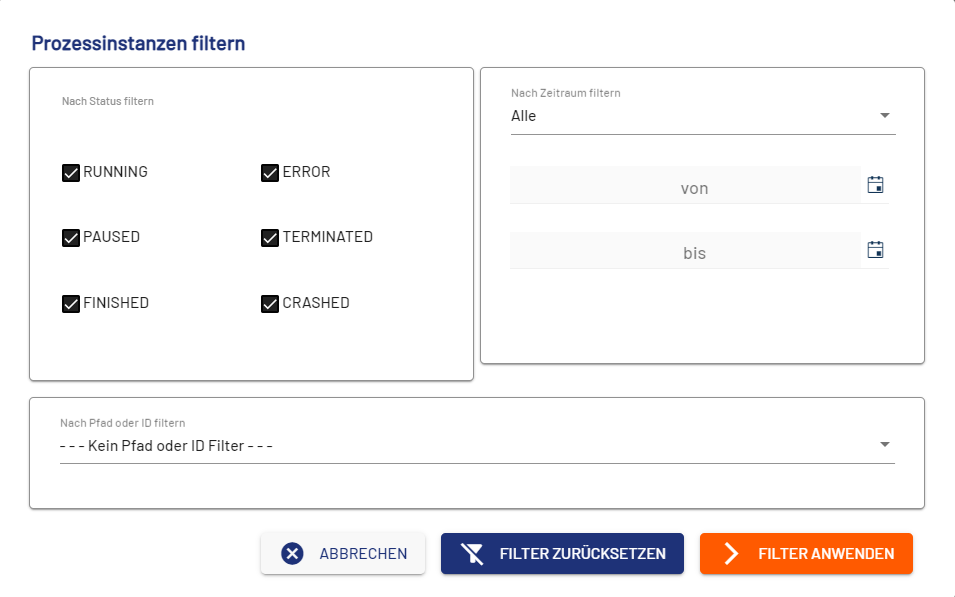
If you select the Filter button in the Instance view, the Filter Process Instances dialog opens. In this dialog, you can set various filter criteria.
|
Element |
Description |
|---|---|
|
By Status |
Select which process states to display. If you do not make a selection here, all processes are displayed regardless of status. |
|
By Time Interval |
Specify the time period for which process instances are to be displayed. Possible values:
|
|
By path or ID |
Select options to filter by path or process ID. Possible values:
|
|
Cancel |
Cancels the definition of filter criteria. If you have previously set and applied filter criteria, they are retained even if you select Cancel. |
|
Remove |
Removes all set filters. |
|
Apply |
Applies the selected filter(s). |