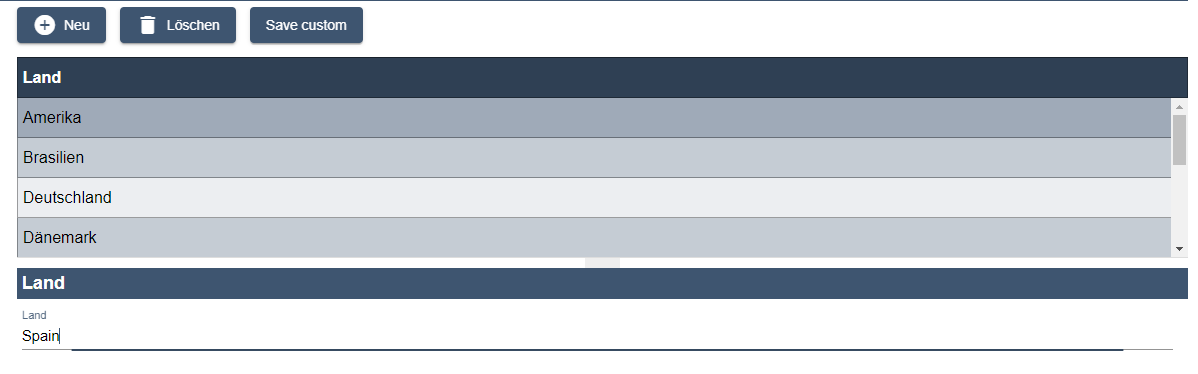
The custom action is created with the element <CustomAction/> within <Actions>. With a custom action simple actions without predefined text or predefined icon can be implemented.
In addition to the standard attributes for actions, the element <CustomAction/> can have the following attributes:
|
Attribute |
Description |
|---|---|
|
|
Label of the button.
Possible values: Any string or translation key |
|
|
Allows the navigation to an external website by defining an external link.
Possible values: String (URL) In detail components, the external link can also be provided by a Technical Process. A Technical Process (attribute XML
|
|
|
Defines whether the link ( Possible values:
|
|
|
Allows validation of the input Possible values:
|
|
|
Allows the navigation to an external website by defining an external link.
|
Example
<DetailComponent path="Dashboard" displayName="Dashboard" default="true">
	<Actions>
	<CustomAction componentName="CountryList"
    			  displayName="Save custom"
    			  validated="true"
   				  process="/WebApp/Administration/Country/CreateOrUpdateCountry.wrf"/>
	</Actions>
	<FlowLayout>
		…
	</FlowLayout>
</DetailComponent>
The above example creates the custom action Save customer: