
How to install the adapter manually
-
Unpack the ZIP folder of the adapter.
-
Copy the folder of the adapter to the folder
<server_directory>\wildfly\modules\de\softproject\x4\adapter. -
Make sure that in the folder
<server_directory>\wildfly\modules\de\softproject\x4\adapter\<name of the adapter>\mainin themodule.xmlfile in the<resources>element the paths<resource-root path="" />correspond to the names in the*.jarfiles.
Example using the BAM Log Adapter:-
Names of the
*.jarfiles: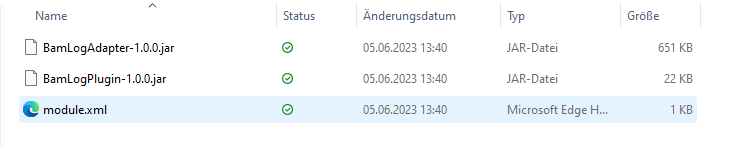
-
Content of the
module.xmlfile: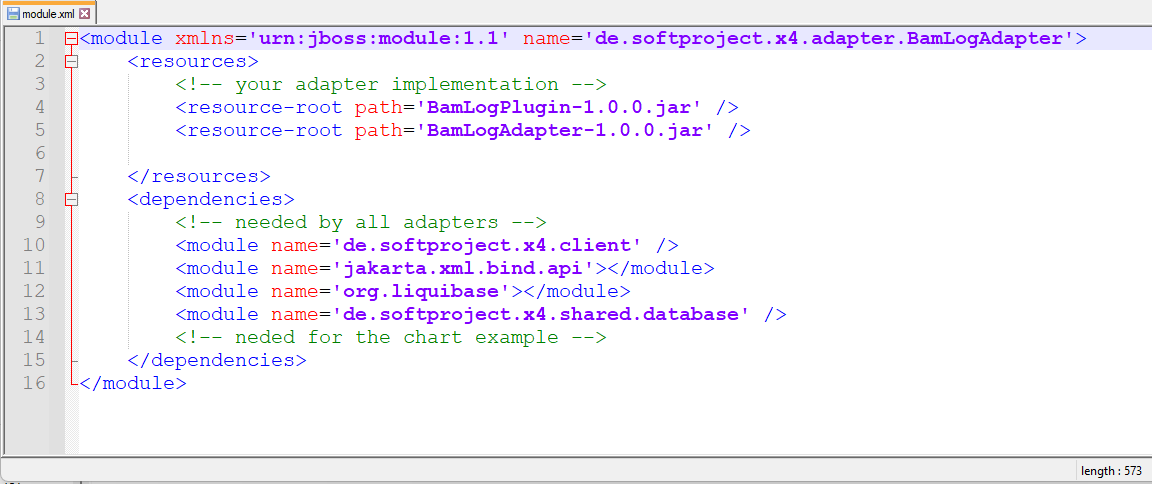
-
-
Add the adapter name to the
module.xmlfile in the folder<server_directory>\wildfly\modules\de\softproject\plugins\main:-
Open the
module.xmlfile in the folder<server_directory>\wildfly\modules\de\softproject\plugins\main. -
Cope the adapter name into the
<dependencies>tag:<module name="de.softproject.x4.adapter.<name of the adapter>" export="true"/> -
Save the
module.xmlfile.
-
-
Start Keycloak, the X4 Server and the X4 Designer.
The adapter can now be selected and used in the X4 Designer.