
Adapters that are not included as standard, as well as adapters or plugins that you have created yourself, can be installed manually in X4 BPMS.
How to install adapters manually
-
Unpack the ZIP folder of the adapter.
-
Copy the folder of the adapter to the folder
<server_directory>\wildfly\modules\de\softproject\x4\adapter. -
Make sure that in the folder
<server_directory>\wildfly\modules\de\softproject\x4\adapter\<name of the adapter>\mainin the filemodule.xmlin the element<resources>the paths<resource-root path="" />correspond to the names in the*.jarfiles.
Example using the BAM Log Adapter:-
Names of the
*.jarfiles: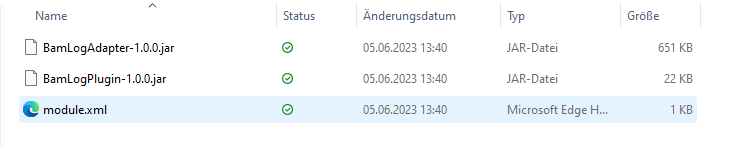
-
Content of the file
module.xml: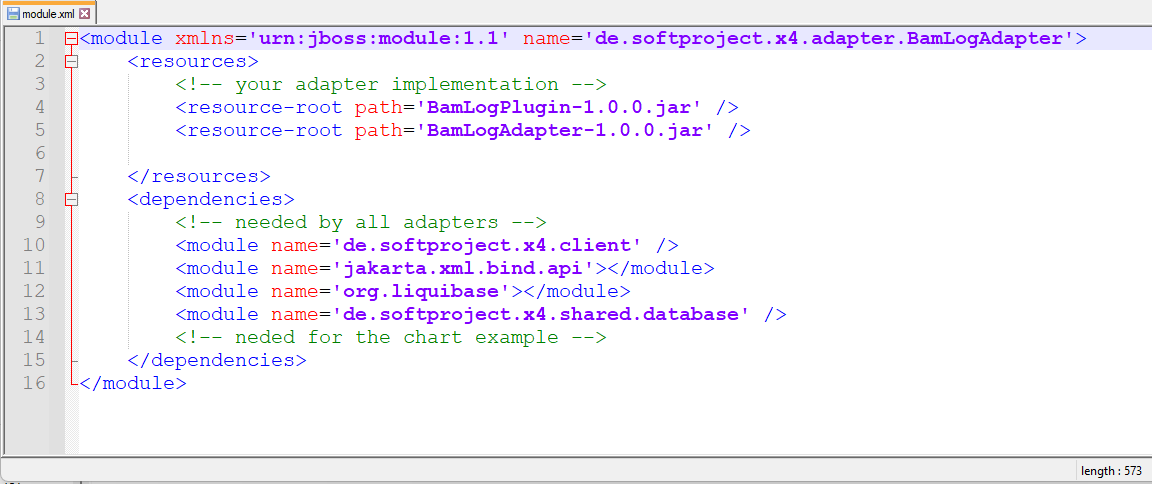
-
-
Add the adapter name to the
module.xmlfile in the folder<server_directory>\wildfly\modules\de\softproject\plugins\main:-
Open the
module.xmlfile in the folder<server_directory>\wildfly\modules\de\softproject\plugins\main. -
Copy the adapter name in the
<dependencies>tag:<module name="de.softproject.x4.adapter.<name of the adapter>" export="true"/>
-
Note on the path and name of the adapter in the module.xml file:
The path below <server_directory>\wildfly\modules... corresponds dot-separated instead of slash-separated to the name of the adapter in the module.xml file.
Example:
Path: <server_directory>\wildfly\modules\de\softproject\x4\adapter\CustomAdapter
Name of the adapter in the module.xml file: de.softproject.x4.adapter.CustomAdapter
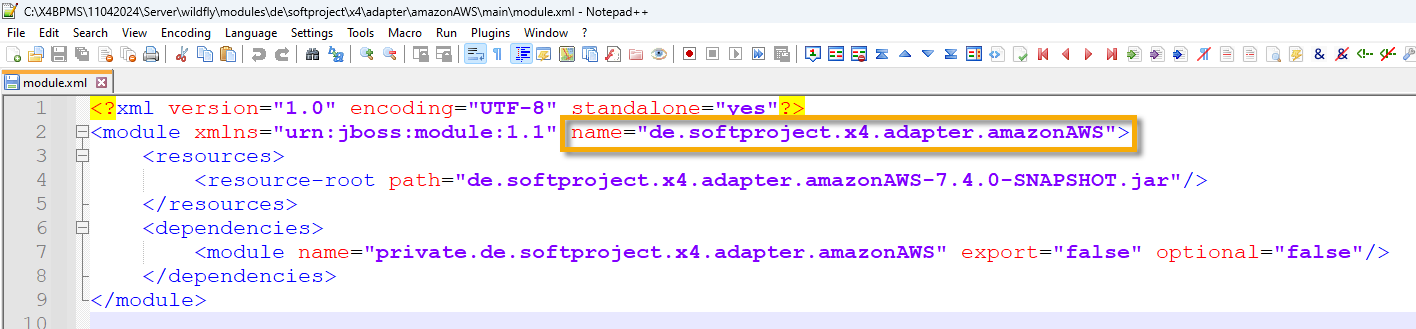
c. Save the module.xml file.
-
Start Keycloak, the X4 Server and the X4 Designer.
The adapter can now be selected and used in the X4 Designer.
Note on the subfolders in <server_directory>\wildfly\modules\de\softproject
|
Path |
Description |
|---|---|
|
|
Empty module for custom modules
|
|
|
Contains all module dependencies required by X4 BPMS. |
|
|
Contains all preconfigured module dependencies. |
|
|
All standard X4 BPMS modules |
-
Unpack the ZIP folder of the adapter.
-
Copy the folder of the adapter to the folder
<server_directory>\wildfly\modules\de\softproject\x4\adapter. -
Make sure that in the folder
<server_directory>\wildfly\modules\de\softproject\x4\adapter\<name of the adapter>\mainin the filemodule.xmlin the element<resources>the paths<resource-root path="" />correspond to the names in the*.jarfiles.
Example using the BAM Log Adapter:-
Names of the
*.jarfiles:
-
Content of the file
module.xml:
-
-
Add the adapter in file
module.xmlin the folder<server_directory>\wildfly\modules\de\softproject\plugins\main:-
Open the file
module.xmlin the folder<server_directory>\wildfly\modules\de\softproject\plugins\main. -
Copy the adapter name in the tag
<dependencies>:<module name="de.softproject.x4.adapter.<name of the adapter>" export="true"/> -
Save the file
module.xml.
-
-
Start Keycloak, the X4 Server and the X4 Designer.
The adapter can now be selected and used in the X4 Designer.