

|
|
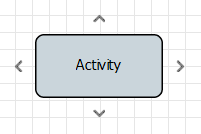
As soon as you move the mouse over events, gateways or activities, four docking points appear. Click and drag one of the docking points to create a sequence flow line.
Properties
|
|
Free text area to set a label to the sequence flow (for a clearer layout or documentation purposes) |
|
|
Enable logging via Log4j at this position in the process using current input data. To enable Log4j logging, select the property, and click Possible values:
|
|
|
Set save point at this point of the process to persist the complete state of the process engine with the processed data and state information when executing a process instance in the file system. The process instance can be restarted from the last saved save point via the monitoring interface. Possible values:
|
|
|
Component from which the sequence flow starts (is set by the X4 Designer) |
|
|
Component to which the sequence flow leads (is set by the X4 Designer) |
|
|
For forks ( Possible values:
|
|
|
For condition blocks: Execution condition stored by the Condition Manager. |
