
The authentication provider Keycloak has to be installed to use the X4 BPMS.
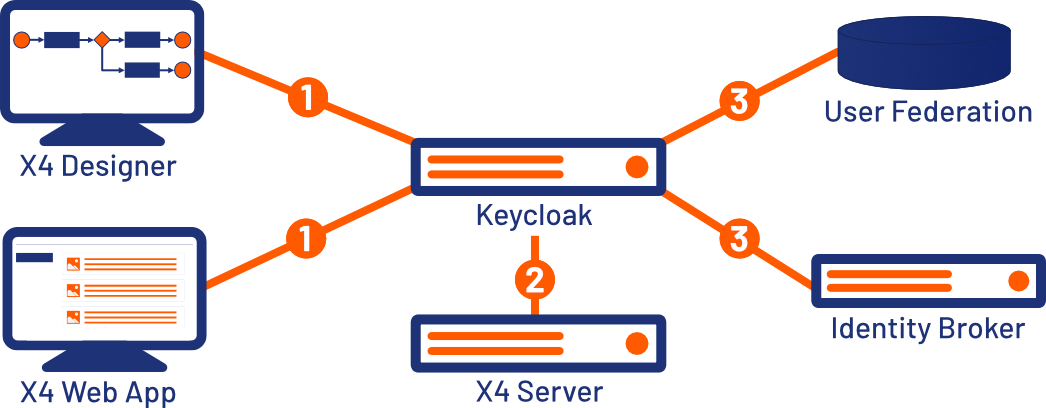
All components of X4 BPMS use the authentication provider Keycloak for authentication and authorization. The users, groups and roles are managed in Keycloak. The included Keycloak is already connected using a central configuration.
However, you also have the possibility of connecting existing identity providers such as LDAP or Active Directory using the included Keycloak. Keycloak also supports the integration of external providers such as Microsoft, Google or Facebook.
|
1 |
Authenticate |
|---|---|
|
2 |
Token creation and validation |
|
3 |
Connect |
Keycloak is shipped with an H2 database by default so that Keycloak can be used without further configuration. However, the H2 database is not suitable for productive operation due to security weaknesses and limited scalability. Therefore, we recommend the use of an alternative database. Before using the Keycloak productively, you should therefore connect an alternative database.
How to connect databases to Keycloak is described in the official Keycloak documentation.