
Using URL Parameters
What are URL parameters?
URL parameters are parts of a URL that pass data to Web App. They are are often used to generate dynamic content on a web page, such as an e-commerce platform, or to pass data to an application, e.g. an online form. Another possible use case is deep links.
URL parameters can be activated in the Web App Configuration, in the .wac file.

Example of URL parameters
Example of one URL parameter:
http://localhost:8080/X4/webapp/URL-Parameter-Demo/Module/Approval?approved=true
ttp://localhost:8080/X4/webapp/HowTo_WebApps/Module/urlParameter?message=hello
Example of several URL parameters:
http://localhost:8080/X4/webapp/URL-Parameter-Demo/Module/Approval?approved=true&id=1234&name=John
How to use URL parameters:
The user clicks on a link with URL parameters as shown above. The URL parameters are passed into all Technical Processes called from the Component which was called by the URL. The URL parameters can then be used in mapping in the technical process.
Example
Example for technical process to get URL parameters:
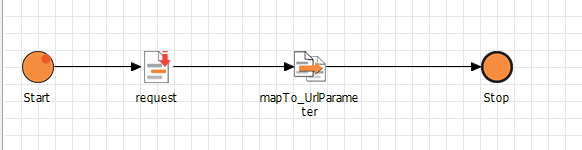
First component: request.xml with operation Write
The URL parameters are passed from the link as input to the request.xml with operation Write.
request.xml with the input format is as follows. The root element of the XML depends on the used component, but the <Parameters> section is always identical:
Example for Input
<?xml version="1.0" encoding="UTF-8"?>
<Get>
   <Component>Components/urlParameter.detail</Component>
   <Parameters>
      <Parameter key="message" value="hello"/>
   </Parameters>
</Get>
Second component: mapTo_UrlParameter.xsl
The information provided by the key and value can then be used in mappings.
Example of a mapping where only input with key='message' is allowed:
Example for Mapping
<?xml version="1.0" encoding="UTF-8" standalone="no"?><xsl:stylesheet xmlns:xsl="http://www.w3.org/1999/XSL/Transform" xmlns:xs="http://www.w3.org/2001/XMLSchema" exclude-result-prefixes="xs" version="2.0">
  <xsl:output method="xml" media-type="text/xml"></xsl:output>
  <xsl:template match="/">
  	<Ok>
  		<URL_PARAMETER>
  			<xsl:value-of select="if(//Parameter[@key = 'message']) then //Parameter[@key = 'message']/@value else ('no Parameter')"></xsl:value-of>
  		</URL_PARAMETER>
  	</Ok>
  </xsl:template>
</xsl:stylesheet><!--Created by X4 Designer, Copyright © SoftProject GmbH. All rights reserved.-->
Output
The output with key='message' is as follows:
Example for Output
<?xml version="1.0" encoding="UTF-8"?>
<Ok>
   <URL_PARAMETER>hello</URL_PARAMETER>
</Ok>