
Migrating Outdated Projects
Outdated projects are specially marked within the Repository Navigator and are only displayed in a read-only view. To further process the projects, the X4 Designer offers a function for migrating the project to the current X4 BPMS version.
To do this, select the desired project in the Repository Navigator and migrate the project via the context menu Migrate Project or the menu Project > Migrate Project.
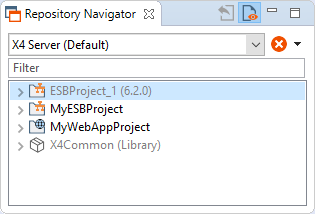

Outdated projects can be migrated to the current X4 BPMS version beginning with version 6.0.0 of X4 BPMS.
Projects with a version older than 6.0.0 must first be manually updated to version 6.0.0.