
Localization
Web applications that are created with Web Apps can be made available in multiple languages.
At the beginning of the .wad file, you must specify the languages in which the web application is to be available within the <Translations> element.
For each language in which the web application is to be available a translation file has to be created in the Translations folder. This language file assigns a variable to a name in a language. The name of the language file consists of the name of the language (usually a two-character language abbreviation) and the file extension translation, for example, de.translation (German language file), en.translation (English language file), or es.translation (Spanish language file).

Note
The name attribute must be declared for the <Translations> element in the .wad file. The value specified for name must match the file name of the language file with file extension.
The value of displayName is displayed during language selection in the Web App.
<?xml version="1.0" encoding="UTF-8" ?>
<WebApp ...>
	<Translations>
		<Translation displayName="Deutsch" name="de.translation"/>
		<Translation displayName="English" name="en.translation"/>
		...
	</Translations>
</WebApp>
If Authorization Code Flow (see <Access>) is set, the following can be defined in Keycloak for login:
- Language selection at login: The user can choose with which language he wants to log in. The web app then opens in the selected language..
- Default language for login: The user then opens the web app in the specified default language.
More information in the official Keycloak documentation: https://www.keycloak.org/docs/latest/server_admin/index.html#enabling-internationalization
Creating a new language file
- Right-click on the
Translationsfolder.
The context menu opens. - Click on New > Translation.
The dialog for creating a new language file opens. - Enter the name of the language file in the File name field.
- Click on Finish.
The language file was created. The language file is filled with predefined values in German and contains each possible key. The language file is structured as follows:
loginLabel = user name
passwordLabel = password
emailLabel = mail
...
The language file consists of a key (e.g. loginlabel) and a corresponding name (e.g. user name). Many elements support more than one language. The corresponding attributes have to be marked with a $ sign and the key, for example loginLabel="$LoginLabel".
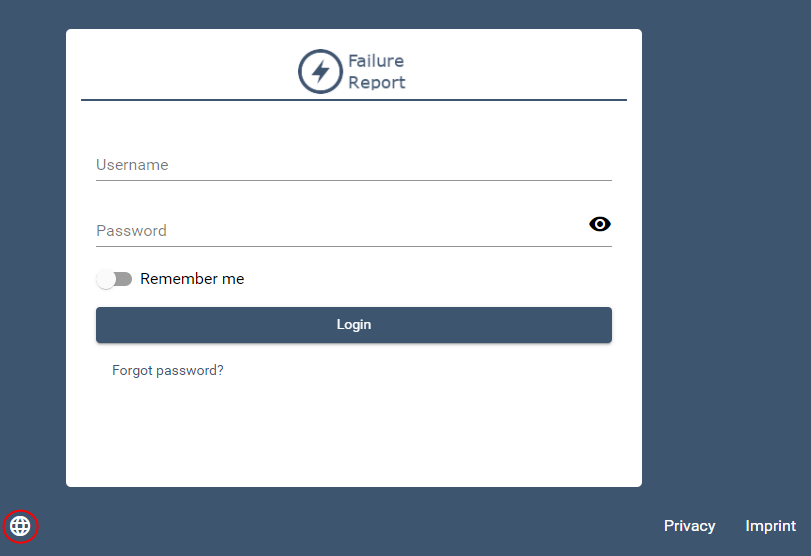
If several languages are available for a Web App, the user can switch between the different languages at any time.
Translation keys
The following translation keys are currently provided in English by default and can be translated into as many languages as required:
##############################################
# System defined translation
# Change the following values according to the language you need or delete to use standard German version instead.
# Add your own keys freely. Both system keys and your own can be used in the .wad , .imprint and .dpr files with translation sign $
# Syntax: <tag attribute="$loginLabel" >
# Warning - Not all attributes in .wad, .imprint and .dpr files are translatable and support translation keys with $ sign!
##############################################
loginLabel=Username
passwordLabel=Password
emailLabel=E-Mail
loginButtonLabel=Login
logoutButtonLabel=Logout
forgotPasswordLabel=Forgot password?
changePasswordLabel=Change password
rememberMeLabel=Remember me
wrongPasswordLabel=The username or password you entered is incorrect.
changeButtonLabel=Change
required=Required
saveBtn=Save
deleteBtn=Delete
newBtn=New
cancelBtn=Cancel
backButton=Back
notFoundToStart=To start page
notFoundText=Page not found
notFoundHeader=404
componentNameNotDeclared=The component name in the action is not declared.
forbiddenHeader=403
forbiddenText=You do not have permission to access. Please contact the administrator.
dataReloaded=The selected data record was changed in the background. The page is reloaded.
changePasswordButtonOk=Save
changePasswordButtonCancel=Cancel
changePasswordInvalid=Check your Password
changePasswordSuccess=Your password has been changed
changePasswordWrong=Password does not comply with the password guidelines
changePasswordReused=Password has already been used
changePasswordDoNotMatch=Passwords do not match
changePasswordNewPassword=New Password
changePasswordOldPassword=Old Password
changePasswordRepeat=Repeat
forgotPasswordButtonOk=Send
forgotPasswordButtonCancel=Back
forgotPasswordRestoreField=E-Mail
greetLabel=Welcome
errorHeader=Error
passwordNotChanged=The password has not been changed. Please check your input.
requestError=Unfortunately, an error occurred during the request. Please try again later.
passwordEmailSent=We have sent an E-Mail with further instructions.
leavePageWithUnsavedDataHeader=Are you sure you want to leave this page?
leavePageWithUnsavedDataText=Your changes will be discarded when you leave the page.
leavePageWithUnsavedDataOkButton=Leave page
leavePageWithUnsavedDataCancelButton=Stay on page
uploadBtn=Upload
downloadBtn=Download
multipleNavigationHeader=Navigation error
multipleNavigationText=Only one navigation can be defined.
next=Next
prev=Previous
today=Today
monthView=Month
weekView=Week
dayView=Day
monday=Monday
tuesday=Tuesday
wednesday=Wednesday
thursday=Thursday
friday=Friday
saturday=Saturday
sunday=Sunday
mondayShort=Mon
tuesdayShort=Tue
wednesdayShort=Wed
thursdayShort=Thu
fridayShort=Fri
saturdayShort=Sat
sundayShort=Sun
january=January
february=February
march=March
april=April
may=May
june=June
july=July
august=August
september=September
october=October
november=November
december=December
start=Start
end=End
location=Location
description=Description
allDay=All day
start=Start
destination=Destination
search=Search
routingErrorTitle=Error
routingError=The route could not be calculated.
languagesLabel=Language selection
scrollingDesktopNonMacWarning=Use Ctrl + Scroll to zoom the map
scrollingDesktopMacWarning=Use \u2318 + Scroll to zoom the map
scrollingMobileWarning=Use to fingers to move the map
registerLabel=Register
titleLabel=Your privacy is important to us
defaultCookieConsentText=Some cookies are essential for the website to function properly, while others help us to optimize and improve your experience on our website.
dprLabel=Data protection
imprintLabel=Imprint
externalMediaCookiesTitle=External Media
externalMediaCookiesDescription=Content from video platforms and Social-Media-Platforms is blocked by default. If ExternalMedia-Cookies are accepted, access to them is possible.
preferencesLabel=Preferences
necessaryCookiesBtn=Only allow necessary cookies
allowSelectionBtn=Allow selection
preferencesTitle=Cookie-Settings
preferencesText=Cookies are small text files that websites can use to analyze and measure interactions and to optimize and improve your experience on our website. This website uses different types of cookies. Some cookies are essential for the operation of this website; for all other types of cookies we need your consent. Some cookies are set by third party services that appear on our websites.
allowAllCookiesBtn=Allow all cookies
essentialCookiesTitle=Essential
essentialCookiesDescription=Essential cookies are required to use basic functions and to ensure the smooth functioning of the website.
sixMonthText=6 Months
youtubePurposeText=Used to unblock YouTube content.
bingPurposeText=Used to unblock Bing content.
showCookiesDetailsLabel=Show details about cookies
acceptLabel=Accept
nameLabel=Name
providerLabel=Provider
purposeLabel=Task
hostLabel=Host(s)
cookieNameLabel=Cookie Name
expiryLabel=Cookie process
waitTitle=Please wait
waitText=You will be redirected in a moment.
waitButton=For registration
decimalValidation=Please insert a decimal number. It can only contain one separator character.
integerValidation=Please insert an integer number. It can not contain separator characters.
##############################################
# End of system defined translation
##############################################