
Grid Component
A Grid Component is ideal for mapping data in a tabular representation. The behavior of the Grid Component can be defined via individual elements in the Grid Settings.

Note:
The Grid Component will be optimized for display on mobile devices in a future version of the X4 BPMS.
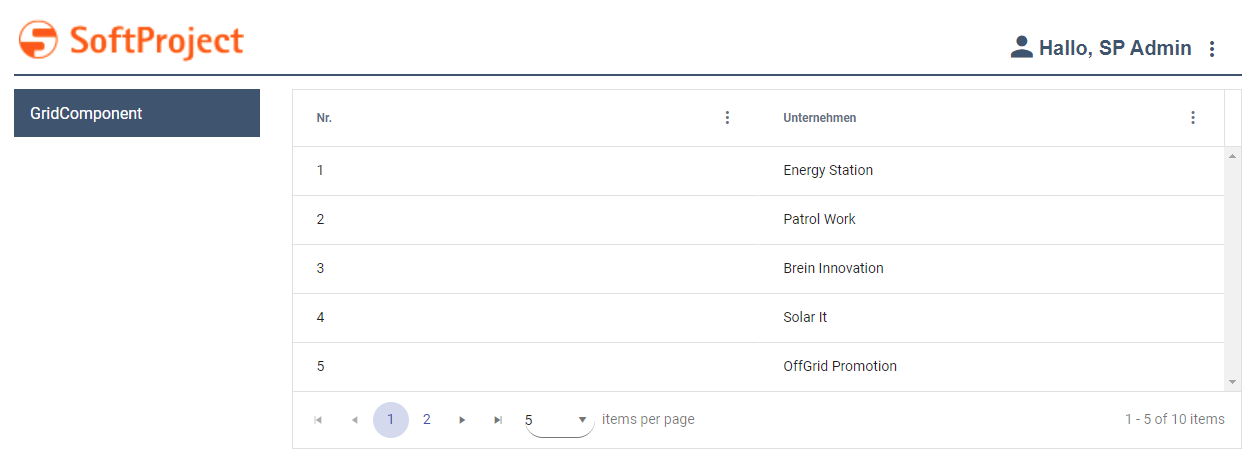
Defining the Grid Component
A Grid Component is declared within its own <GridName>.grid definition file. This file is created in the Components project folder.
How to create a new definition file
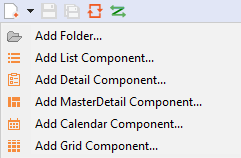
Click the New > Add <name of component> menu.
Alternatively, you can create the file using the New > Add <name of component> context menu.Select the desired definition file.
In File name, enter the name of the definition file.
Select Finish.
A new definition file with a predefined structure is created.
The data to be displayed must be provided by a Technical Process and must comply with a specific data model.
The data model supplied by the Technical Process must be mapped in the Properties. In order to link the data supplied by the Technical Process with the representation within the web application, the corresponding property must be defined and stored in the definition of the <GridColumn/> via Data Binding.
Note:
If a property is to be used in a Grid Component, it must be defined with the Complex type. This property can contain additional properties.
The Grid Component is created via the <GridComponent> element, which can have the following attributes:
Attribute | Description |
|---|---|
| Defines a background color.
This setting overrides the default color of the color scheme. Possible values: |
| Defines the font family within the component. The property is inherited by all controls and actions of the component.
Possible values: Font code from the font palette, e.g. |
| Defines the font size within the component. The property is inherited by all controls and actions of the component.
Possible values:
|
| Defines the width of each character. The property is inherited by all controls and actions of the component.
Possible values:
|
| Defines the tilt of the font. The property is inherited by all controls and actions of the component.
Possible values:
|
| Defines the font weight. The property is inherited by all controls and actions of the component.
Possible values:
|
| Defines the font color.
This setting overrides the default color of the color scheme. Possible values: |
| Defines the background color of the header.
This setting overrides the default color of the color scheme. Possible values: |
| Defines the font color of the header.
This setting overrides the default color of the color scheme. Possible values: |
| Defines the font family of the header.
Possible values: Font code from the font palette, e.g. |
| Defines the font weight of the header.
Possible values:
|
| Defines the color of the icon of the Component.
This setting overrides the default color of the color scheme. Possible values: |
| Path to a graphic file or specification of a Material Icon that is used as an icon of the component.
Possible values:
With |
| Defines the number of rows displayed per page. Possible values:
|
| Required. Path to the Possible values: String (URI) |
| Title of the component. Appears as a header in the application.
Possible values: Any string or expression for data binding |
| Defines a title background color.
Possible values: |
| Defines a color for the title foreground.
Possible values: |
| Path to a The The path is specified relative to the Possible values: String (URI) |
| Defines the visibility.
Possible values: Boolean or string for data binding |


Example of a Grid Component
<?xml version="1.0" encoding="UTF-8"?>
<GridComponent xmlns="http://softproject.de/webapp/1.0" process="loadGrid.wrf">
	<Properties>
		<Property name="list" type="Complex">
			<Property name="id" type="Integer" displayName="No." />
			<Property name="company" type="String" displayName="Company" />
		</Property>
	</Properties>
	<GridSettings>
		<Resize />
		<Reorder />
		<ColumnVisibility />
		<Filtering />
		<Multiselect checkboxSelection="true" />
		<Autoselection />
	</GridSettings>
	<GridColumns>
		<GridColumn value="#list.id" sortable="true" />
		<GridColumn value="#list.company" />
	</GridColumns>
</GridComponent>
Output format of the process
The Technical Process loadGrid.wrf mentioned in the example generates the following output:
<OkList>
   <list>
      <id>1</id>
      <company>Energy Station</company>
   </list>
   <list>
      <id>2</id>
      <company>Patrol Work</company>
   </list>
   <list>
      <id>3</id>
      <company>Brain Innovation</company>
   </list>
   <list>
      <id>4</id>
      <company>Solar It</company>
   </list>
   <list>
      <id>5</id>
      <company>OffGrid Promotion</company>
   </list>
   <list>
      <id>6</id>
      <company>SoftProject GmbH</company>
   </list>
   <list>
      <id>7</id>
      <company>SoftProject Ibérica SL</company>
   </list>
   <list>
      <id>8</id>
      <company>SP Digital AG</company>
   </list>
</OkList>
Grid Settings
Within the GridSettings element, the elements listed below can be declared to determine the behavior of the Grid Component.
Possible elements
Element | Description |
|---|---|
| The When using the Possible values:
Note If you declare the |
| The 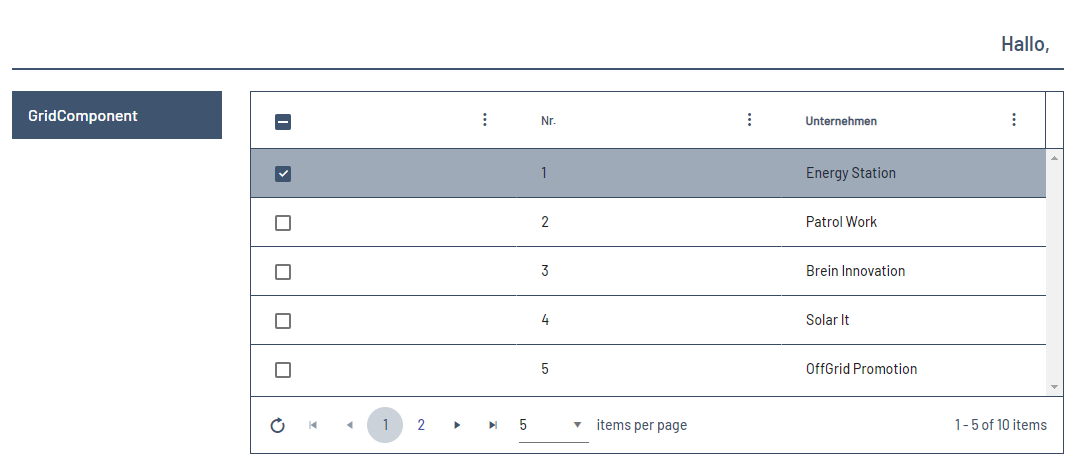 |
| The 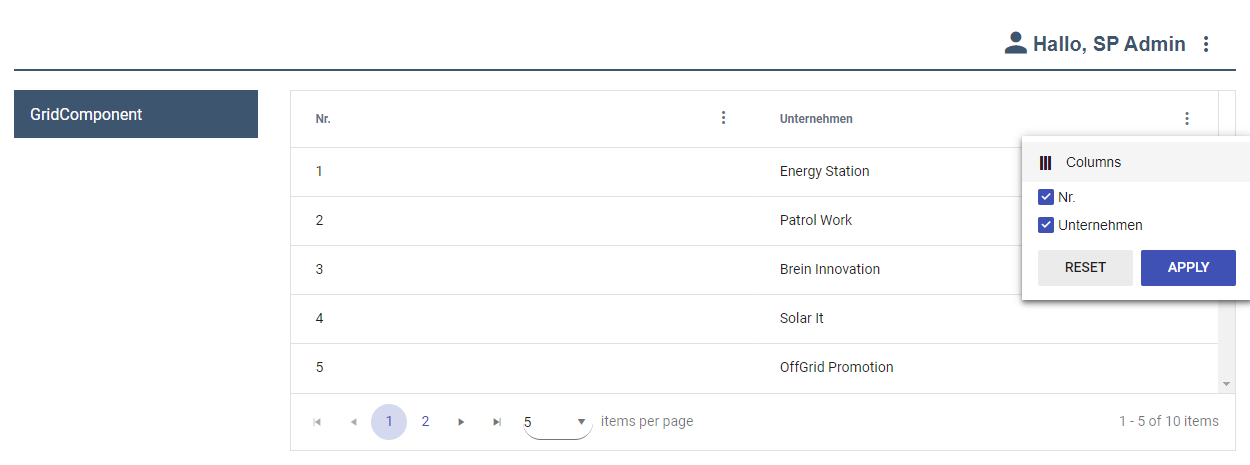 |
| The When using the Possible values:
|
| The 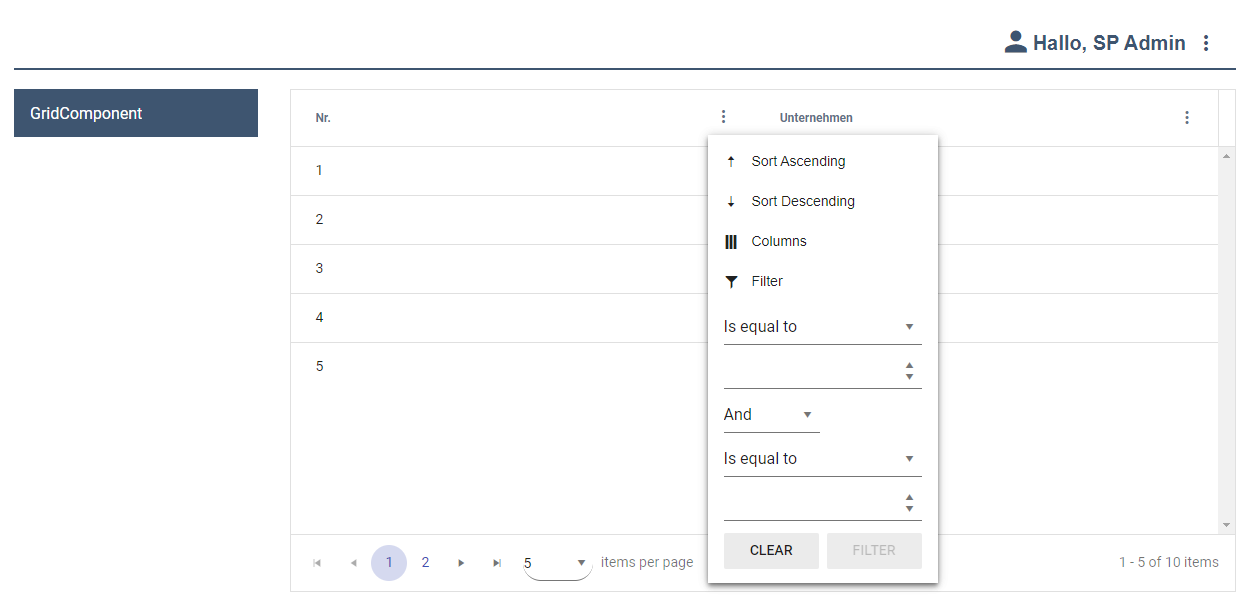 |
| The When using the
Note: Advanced users can alternatively delete the settings in the browser as follows:
Possible values:
Possible values:
Note: If server-side paging is enabled and
Possible values:
Note: If all three attributes are set to  Note: The |
| The When using the Possible values:
|
| The When using the Possible values:
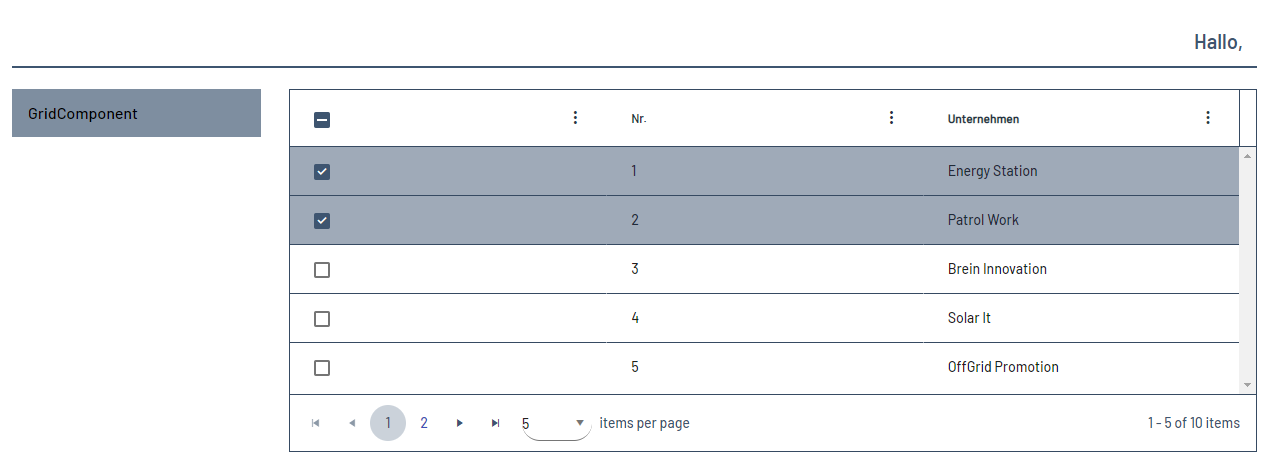 |
| The When using the
Specifies whether the specified filter setting should be saved and applied the next time it is opened.
Possible values:
Specifies whether the specified pagination setting should be saved and applied the next time the Grid Component is opened.
Possible values:
Specifies whether to save the specified setting for the selection of elements in the Web App and apply it the next time the Grid Component is opened. Possible values:
Specifies whether to save the specified sort setting and apply it the next time the Grid Component is opened.
Possible values:
Specifies whether to save the specified visibility setting and apply it the next time the Grid Component is opened.
Possible values:
|
| The 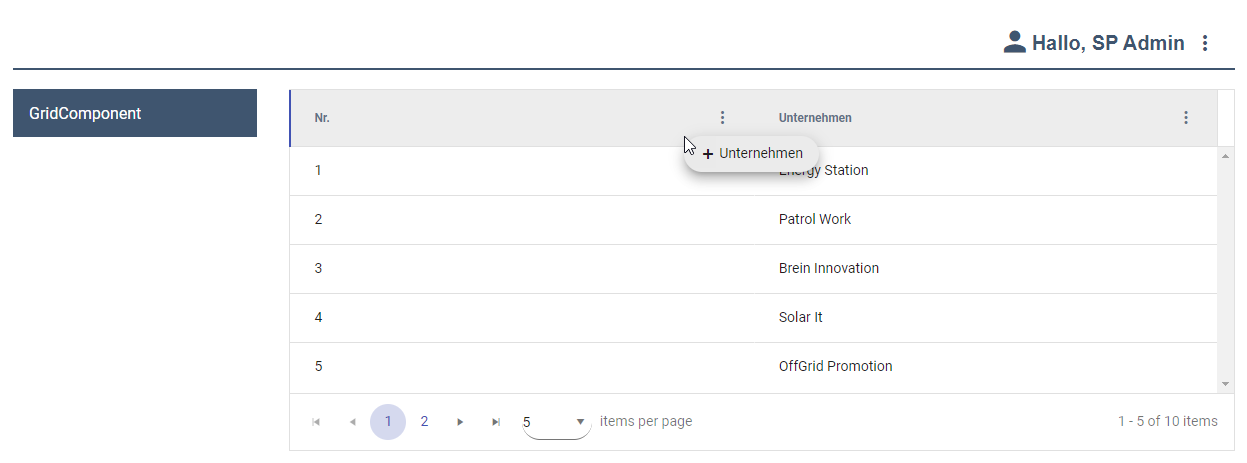 |
| The 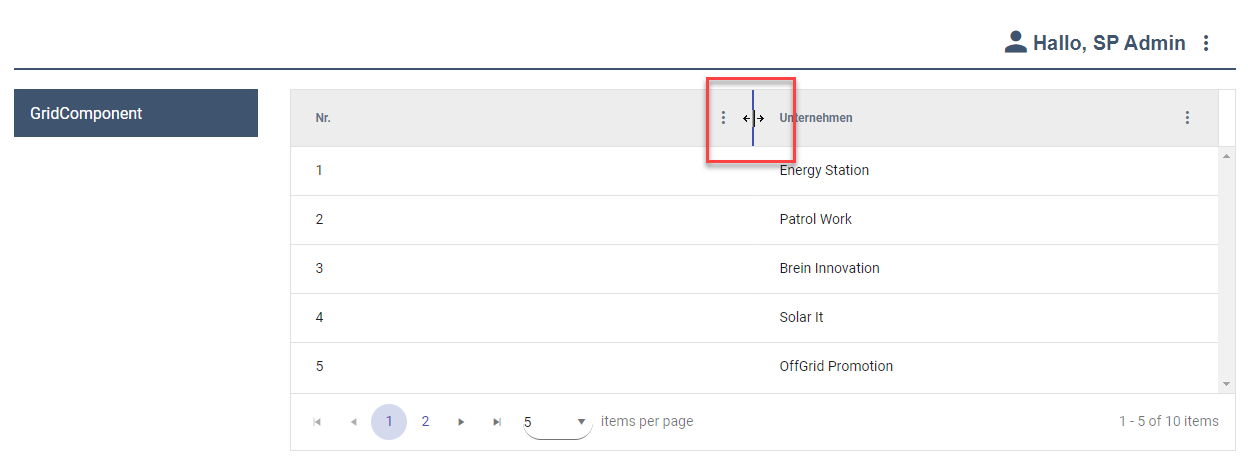 |
| The |
Defining rows in the Grid Component
Within the Grid Component, the rows must be defined via the RowSettings element. The RowStyle element included in RowSettings allows you to set colors for individual rows.
Note:
If a cell is in an intersection of row and column that has colors set, the column definitions take precedence.
Within the RowSettings element, the RowStyle element can be declared, which can have the following attributes:
Attribute | Description |
|---|---|
| Defines a background color.
Possible values: |
| Defines the font family within the component. The property is inherited by all controls and actions of the component.
Possible values: Font code from the font palette, e.g. |
| Defines the font size within the component. The property is inherited by all controls and actions of the component.
Possible values:
|
| Defines the width of each character. The property is inherited by all controls and actions of the component.
Possible values:
|
| Defines the tilt of the font. The property is inherited by all controls and actions of the component.
Possible values:
|
| Defines the font weight. The property is inherited by all controls and actions of the component.
Possible values:
|
| Defines the font color.
This setting overrides the default color of the color scheme. Possible values: |
| Defines the background color of the selected row when the user hovers over the row.
Note: Please note that the data binding for this attribute cannot be defined within the property of the type Complex valid for the entire Grid Component, but that a separate property must be defined. Example
XML
This setting overrides the default color of the color scheme. Possible values:
|
| Defines the font color of the selected line when the user hovers over the line.
Note: Please note that the data binding for this attribute cannot be defined within the property of the type Complex valid for the entire Grid Component, but that a separate property must be defined. Example
XML
This setting overrides the default color of the color scheme. Possible values:
|
| Defines the background color of the row when the user selects the row with a mouse click.
Note: Please note that the data binding for this attribute cannot be defined within the property of the type Complex valid for the entire Grid Component, but that a separate property must be defined. Example
XML
This setting overrides the default color of the color scheme. Possible values:
|
| Defines the background color of the row when the user selects the row with a mouse click.
Note: Please note that the data binding for this attribute cannot be defined within the property of the type Complex valid for the entire Grid Component, but that a separate property must be defined. Example
XML
This setting overrides the default color of the color scheme. Possible values:
|
Defining columns in the Grid Component
Within the Grid Component, the columns must be defined using the GridColumn element. All columns must be defined within GridColumn elements.
Possible attributes
Attribute | Description |
|---|---|
| Title of the column.
Possible values: any string Note: For very long column headers that you specify using the
|
| Specifies whether the contents of the column can be edited.
Possible values: |
| Specifies whether the content of the column can be filtered. Note: The
Possible values: |
| Defines the display of the date format including minutes, seconds, or milliseconds. Possible values:
|
| Defines the horizontal orientation of the content within the column. Possible values:
|
| Defines the order of the columns.
Possible values:integers from 0 or string for data binding Note: The column with the lowest number in the |
| Specifies whether to sort by the contents of the column. For more information about sorting column contents, see the Sorting section.
Possible values: |
| Defines the content of the column using data binding. Possible values: String (data binding) If no |
| Specifies whether the column is displayed.
Possible values: |
Grid Column
Within the GridColumn element, the elements listed below can be declared:
Possible elements
Element | Description |
|---|---|
| Defines the appearance of the column. |
| Filters
Note: If data binding is used, a |
The attributes listed below can be declared for the MultiselectFilter element:
Possible attributes
Element | Description |
|---|---|
| Defines the content of the column by means of a database. In the Possible values: String (data binding) |
| Defines the content of the column using data binding. Possible values: String (data binding) |
Example of <MultiselectFilter> without data binding
<?xml version="1.0" encoding="UTF-8"?>
<GridComponent xmlns="http://softproject.de/webapp/1.0"
	process="Grid.wrf">
	<Properties>
		<Property name="Entry" type="Complex">
			<Property name="Field" displayName="Field" type="String"></Property>
		</Property>
		<Property name="Filter" type="List">
			<Property name="Option" type="String"></Property>
		</Property>
	</Properties>
	<GridSettings>
		<Filtering />
	</GridSettings>
	<GridColumns>
		<GridColumn editable="false" value="#Entry.Field"
			sortable="true">
			<MultiselectFilter>
				<Option value="1" />
				<Option value="2" />
				<Option value="3" />
			</MultiselectFilter>
		</GridColumn>
	</GridColumns>
</GridComponent>
Example of <MultiselectFilter> with data binding
<?xml version="1.0" encoding="UTF-8"?>
<GridComponent xmlns="http://softproject.de/webapp/1.0"
	process="Grid.wrf">
	<Properties>
		<Property name="Entry" type="Complex">
			<Property name="Field" displayName="Field" type="String"></Property>
		</Property>
		<Property name="Filter" type="List">
			<Property name="Option" type="String"></Property>
		</Property>
	</Properties>
	<GridSettings>
		<Filtering />
	</GridSettings>
	<GridColumns>
		<GridColumn editable="false" value="#Entry.Field"
			sortable="true">
			<MultiselectFilter list="#Filter" value="#Option" />
		</GridColumn>
	</GridColumns>
</GridComponent>
The <ColumnStyle> element can have the following attributes:
Attribute | Description |
|---|---|
| Defines a background color.
Note: Please note that the data binding for this attribute cannot be defined within the property of the type Complex valid for the entire Grid Component, but that a separate property must be defined. Example
XML
This setting overrides the default color of the color scheme. Possible values:
|
| Defines the font family within the component. The property is inherited by all controls and actions of the component.
Possible values: Font code from the font palette, e.g. |
| Defines the font size within the component. The property is inherited by all controls and actions of the component.
Possible values:
|
| Defines the width of each character. The property is inherited by all controls and actions of the component.
Possible values:
|
| Defines the tilt of the font. The property is inherited by all controls and actions of the component.
Possible values:
|
| Defines the font weight. The property is inherited by all controls and actions of the component.
Possible values:
|
| Defines the font color.
Note: Please note that the data binding for this attribute cannot be defined within the property of the type Complex valid for the entire Grid Component, but that a separate property must be defined. Example
XML
This setting overrides the default color of the color scheme. Possible values:
|
| Specifies what should happen if overflowing text cannot be displayed. Possible values:
|
| Defines the column width. Possible values:
The unit in which the column width is specified is set with the |
| Specifies the unit in which the column width is specified. Possible values:
|
Periodic reload
The ReloadTimer element can be used to periodically reload the Grid Component.
Periodic reloading of data can cause a heavy load and should only be used in rare cases.
Possible attributes
Attribute | Description |
|---|---|
| Time to reload in seconds
Possible values: Any integer |
| Optional: unique key for the data displayed in the rows
Possible values: Data binding to a defined property of the Grid Component |
<SelectAction> within the Grid Component
The Select action is generated via the <SelectAction/> element within <Actions> and is triggered when a user selects an entry from a Grid Component.
<DoubleClickAction> within the Grid Component
The DoubleClick action is generated via the <DoubleClickAction/> element within <Actions> and is triggered when a user double-clicks an entry from a Grid Component.
Note:
If the Editing attribute in the GridSettings element and the editable attribute in the GridColumn element are set to true, the DoubleClick action has no effect.
<SaveAction> within the Grid Component
The Save action is created via the <SaveAction/> element within <Actions>. The Save action saves entered data. The status depends on the validation status.
Note:
When the Save action is defined, the Technical Process receives the data objects of the edited rows with a new index attribute that contains the index of a row. Numbering begins at 0.