Connecting Process Components
|
|

Properties

Note:
Some properties are only visible if the Show Advanced Properties option is enabled in the Properties view.
| Free text field for labeling the transition (for a clearer design or documentation) |
| Enable logging via Log4j at this point in the process with the current input data. To enable Log4j logging, highlight the property and click Possible values:
|
| Set savepoint at this point in the process to persist the complete state of the process engine with the processed data and status information in the file system when executing a process instance. The process instance can be restarted from the last saved savepoint via the monitoring interface. Possible values:
Note: If you are working with X4 BPMS 7.4.0 or higher, the WildFly version used may restrict the amount of data processed when loading savepoints. See Savepoint Configuration for the X4 Server more information on how to remove or expand the appropriate restrictions. |
| Component at which the transition line startes (is set by the X4 Designer) |
| Component to which the transition line leads (is set by the X4 Designer) |
| For Possible values:
|
| For condition components: execution condition stored by the Condition Manager (is set by the Condition Manager) |

Example
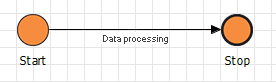
Transition between two process components with a label: